
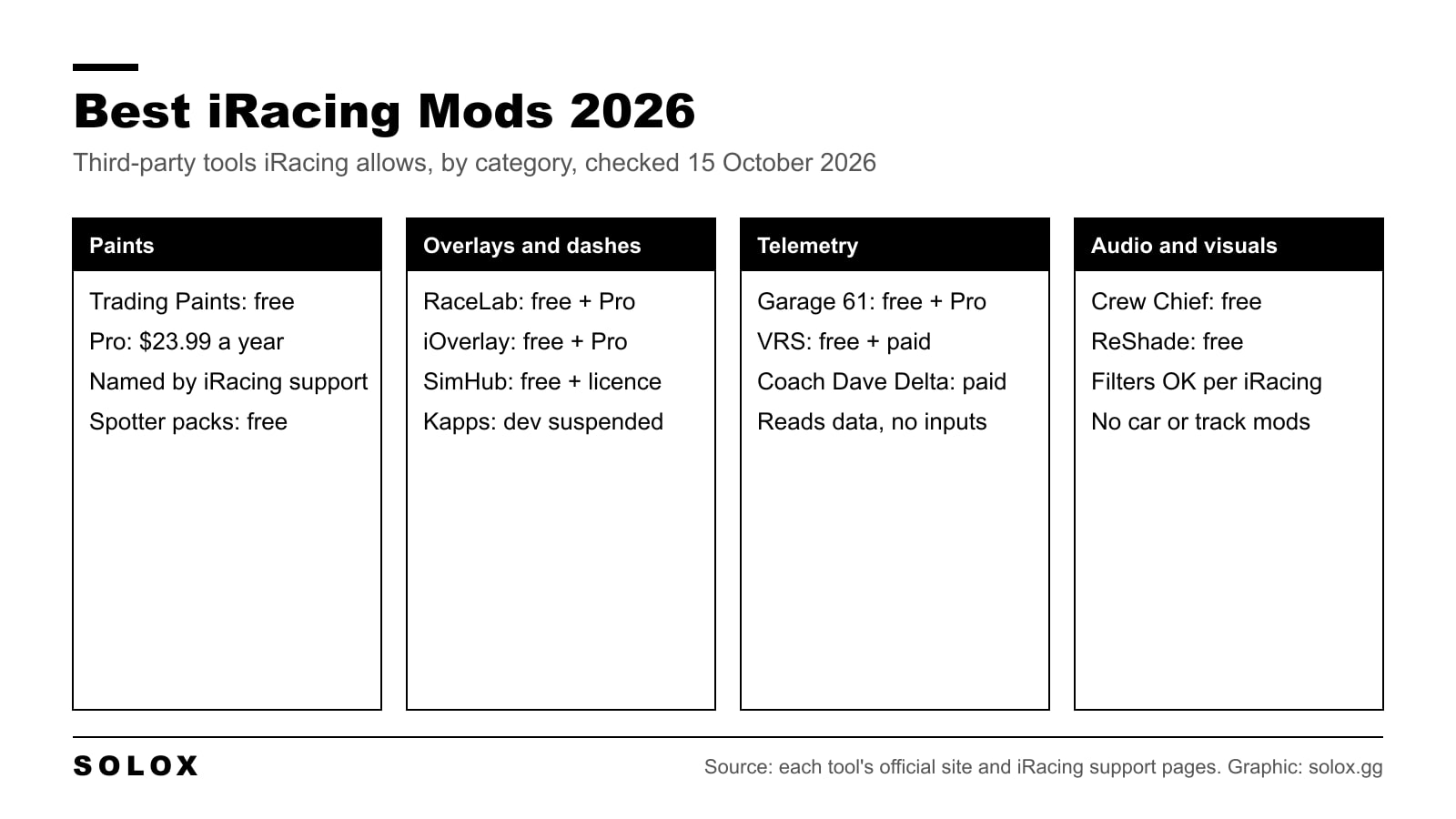
iRacing does not take mods the way Assetto Corsa does. You cannot add cars, tracks or change the physics. So the best iRacing mods are the third-party apps that sit around the sim: Trading Paints for liveries, overlays like RaceLab and iOverlay, SimHub dashboards, telemetry from Garage 61, VRS or Coach Dave Delta, Crew Chief as your race engineer, and ReShade for colour filters. All of them are below, with what iRacing says about them and what they cost today.
Checked on 15 October 2026 against iRacing's support articles "How do I custom paint my iRacing cars?" (modified 9 September 2025), "Using Third Party Spotter Packs" (modified 1 June 2026), "Hardware and Software for iRacers with Physical Challenges and Other Disabilities" (modified 9 September 2025), the 2025 Season 1 Vehicle Telemetry Update notes (25 February 2025), the 2024 Season 2 Patch 4 and 2025 Season 1 Patch 2 release notes, the iRacing Official Sporting Code dated 9 September 2026, and the official site of every tool listed. Where a price or detail is not published, I say so.
Can you mod iRacing at all?
Not in the classic sense. There is no mod folder for cars, tracks or physics. Every car and track comes from iRacing, and the sim runs with anti-cheat. Since the 2024 Season 2 Patch 4 that is Epic Online Services, and the 2025 Season 1 Patch 2 notes say iRacing removed the older EasyAntiCheat files from the install.
What iRacing does allow is the stuff around the sim. Its own support pages say so in plain words:
- Paints. "iRacing also supports third party paint tools, such as Trading Paints."
- Telemetry. The 2025 telemetry update notes talk about "the current telemetry used by Atlas, Motec and other 3rd party applications" and say nothing changes for those apps.
- Spotter packs. There is a support article on installing third-party spotter packs. They can change the wording or language of the spotter calls, but they cannot create new messages.
- Visual filters. The accessibility article says you can use ReShade or Nvidia GeForce Experience to apply custom filters, for example to raise contrast.
The hard line is in the Sporting Code. Rule 8.1.1.2 says drivers may not use third-party software or hardware to modify or automate direct real-time human control inputs. Rule 8.1.1.4 bans cheating or anything iRacing sees as against the spirit of the sim. So anything that reads data or draws on your screen is fine. Anything that touches your steering, throttle or brake inputs is not, unless iRacing approves it for accessibility.
If the sim refuses to start because of the anti-cheat, that is a different problem. I cover it in why iRacing won't work without Easy Anti-Cheat.
The best iRacing mods at a glance
| Tool | Category | Free option | Paid option (official site, 15 Oct 2026) |
|---|---|---|---|
| Trading Paints | Paints | Yes | Pro, $23.99 a year |
| RaceLab | Overlays | Yes | Pro, €4.90 a month or €49.90 a year |
| iOverlay | Overlays | Yes | Pro, €4.95 a month, €9.95 for 3 months, €29.95 for 12 months |
| Kapps | Overlays | 30 day trial | Twitch subscription to activate. Development suspended |
| SimHub | Dashboards, LEDs, haptics | Yes | Licence, pay what you want from €8, perpetual |
| Garage 61 | Telemetry | Yes | Pro plan, price not on the public site |
| VRS | Telemetry and coaching | Yes (Basic) | Dedicated €4.99 a month, Competitive €9.99 a month |
| Coach Dave Delta | Telemetry, setups, coaching | No | £11.99 a month or £109 a year |
| Crew Chief | Spotter and race engineer | Free, open source | Donations |
| ReShade | Visual filters | Free | Donations |
Prices are what each official site showed on 15 October 2026, in the currency it showed me. They change, so check before you pay.
Paints: Trading Paints
This is the one mod every iRacer ends up with. Trading Paints lets you upload a custom paint for your car, and the people you race see it too. Without it, everyone sees the stock iRacing paint shop design.
iRacing's support article names it directly and calls it a service "designed to work with iRacing." Trading Paints is also listed as a sponsor in iRacing's 2026 Season 2 paint kit.
The free tier already covers the important part:
- Paint cars with iRacing's official templates in Photoshop, GIMP or Photopea.
- Upload your paint so you and your opponents see it.
- Race number paints from the Showroom.
Pro is $23.99 a year. It adds Paint Builder, which lets you design a car in the browser, custom number styles that hide iRacing's stamped numbers, decal layers, paint history and special night race paints.
My verdict: install the free version. Go Pro only if you paint your own cars a lot and want Paint Builder or your own numbers. If you want to make a livery from scratch, start with my guide to making an iRacing livery.
Overlays: RaceLab, iOverlay and Kapps
Overlays put the information iRacing's own black boxes do badly on top of the sim: a relative that is easy to read at speed, standings, a radar for cars alongside, a fuel calculator, input traces.
One thing to know before you start. iOverlay's own FAQ says overlays do not work in exclusive fullscreen, because Windows gives the whole screen to one app. Run iRacing in windowed or borderless mode.
RaceLab
RaceLab has the longest feature list of the overlays here. It supports iRacing plus Le Mans Ultimate, Automobilista 2, ACC, Assetto Corsa, RaceRoom, rFactor 2 and F1. It has overlays, layouts that switch with the car you drive, a community layout library, VR placement and streaming tools.
The free tier is called Basic and covers the essential overlays. Pro is €4.90 a month or €49.90 a year and gives you every overlay.
iOverlay
iOverlay is the lighter option. The free version already includes a standings overlay with 21 driver data columns, a relative, a traffic indicator, a trackmap and Twitch chat. Pro adds all overlays, full customisation, race control and team fuel sharing for €4.95 a month, €9.95 for three months or €29.95 for a year. I wrote a full walkthrough in the iOverlay guide.
Kapps
Kapps was in the old version of this page and it still exists, but read the banner on its site first: "Kapps development is suspended." You activate it through a Twitch subscription to its developer, and if you activated it in the past you can still log in and activate it again. There is a 30 day trial.
My verdict: do not start with Kapps in 2026. If you already have it activated and it works for you, fine. For a new setup, RaceLab or iOverlay are the safer pick because they are still updated.
Best iRacing dash mods
The 2022 version of this article was a list of five SimHub dashboards. SimHub is still the answer for dashboards. The individual community dashes I listed back then I could not confirm as maintained, so I have dropped the names and I point you to the tool itself.
SimHub runs your dashboards on a second screen, phone or tablet, drives Arduino LEDs and displays, and powers bass shakers. Its site says it supports more than 80 sims. Dash Studio lets you build your own dashboards or overlays and download ones the community made.
It is free to download. The licence is pay what you want, from €8, and it is perpetual, not a subscription. The licensed edition runs your Arduinos, displays and shakers at up to 60 FPS instead of 10 FPS, switches games automatically and removes the nag screens. Motion needs its own separate licence.
My verdict: if you run a dash on a second screen, buy the licence. 10 FPS on a rev light is not something I would race with. I explain the setup in how to use the SimHub overlay in iRacing.
Telemetry tools: Garage 61, VRS and Coach Dave Delta
This is where you actually get faster. In real racing the engineer debrief is your trace laid over a faster driver's, corner by corner. These tools give you that comparison at home.
Garage 61
Garage 61 says it "currently focuses on the iRacing platform." You install a small agent, it records your laps, and you compare telemetry and setups in the browser. It also has built-in setup and ghost lap sync, leaderboards and team support.
There is a free account and a Pro plan. The public site does not show the Pro price, so I will not guess it. What the official news page does show: advanced privacy rules and live timing early access are Pro features, and the latest update is from 11 October 2026, so it is very much alive.
VRS
Virtual Racing School now lives at vrs.racing and also sells hardware. For iRacing it does telemetry, datapacks and coaching. The Basic plan is free with three months of telemetry storage. Dedicated is €4.99 a month (€4.16 a month billed yearly) with six months, and Competitive is €9.99 a month (€8.33 billed yearly) with twelve months plus the premium datapacks.
Coach Dave Delta
Delta is setups, data analysis and AI coaching in one app, for iRacing, ACC, Le Mans Ultimate and Gran Turismo 7. There is no free tier listed. It is £11.99 a month or £109 a year on the UK version of the site.
My verdict: start with Garage 61 free. It is built for iRacing, and other drivers upload their laps too, so you have something faster to compare against. Pay for VRS or Delta when you also want setups and a coach lap in one place. If you want to compare against other drivers, read how to see other people's braking and throttle in iRacing.
Spotters: Crew Chief and spotter packs
iRacing's own spotter is fine. Crew Chief is a lot more. It is a free, open-source race engineer and spotter that reads the sim's data and talks to you: cars alongside, fuel, gaps, pit calls, with voice recognition if you want to ask it questions. Its documentation lists iRacing support as "Full."
It is clearly still maintained. The project repository had new commits on 15 October 2026, the day I checked. The project accepts donations but you pay nothing to use it.
Two tips. Download the sound packs and driver names after you install, or it will stay quiet. And turn off iRacing's own spotter voice so you do not get two people shouting in your ear. Full steps in how to use Crew Chief in iRacing, and I compare the two in iRacing spotter vs Crew Chief.
If you only want a different voice or language for the stock spotter, a spotter pack is enough. iRacing's support page explains that packs swap the audio and text of existing messages. Here is how to install one.
Visual tools: ReShade
ReShade is a post-processing injector: sharpening, colour correction, contrast. Version 6.8.0 came out on 2 August 2026 and it is free.
Is it allowed? iRacing's own accessibility article says users can use ReShade or Nvidia GeForce Experience to apply custom filters to the sim. That is the official position I could find. ReShade also says it automatically disables depth information during multiplayer to prevent exploitation.
My verdict: use it for what iRacing describes, colour and contrast. Every filter costs some frame time, so check your FPS before and after. Before you add any filter, get the base image right with my guide to making iRacing look better.
For the wider list of apps around the sim, not only mods, see the best iRacing apps.
FAQ
Does iRacing allow mods?
Not for cars, tracks or physics. It allows third-party apps that read its data or add paints, spotter sounds and visual filters. Its support pages name Trading Paints, third-party spotter packs and ReShade.
Can you get banned for using overlays in iRacing?
The Sporting Code bans third-party software or hardware that modifies or automates your driving inputs, and cheating in general. Overlays and telemetry apps only read data. iRacing's 2025 telemetry notes refer to third-party apps like Atlas and Motec using its telemetry.
Is Trading Paints free?
Yes. The free tier lets you upload custom paints that you and your opponents see. Pro is $23.99 a year and adds Paint Builder, custom numbers and decal layers.
What is the best free overlay for iRacing?
RaceLab Basic and iOverlay free are both strong. iOverlay's free version includes standings, relative, trackmap and a traffic indicator. RaceLab covers more sims if you also race outside iRacing.
Is Kapps still working in 2026?
Its site says development is suspended. You can still download it and activate it with a Twitch subscription, and past subscribers can reactivate. For a new setup I would pick an overlay that is still updated.
Can I use ReShade in iRacing?
Yes. iRacing's accessibility support article says you can use ReShade or Nvidia GeForce Experience to apply custom filters to the sim.