
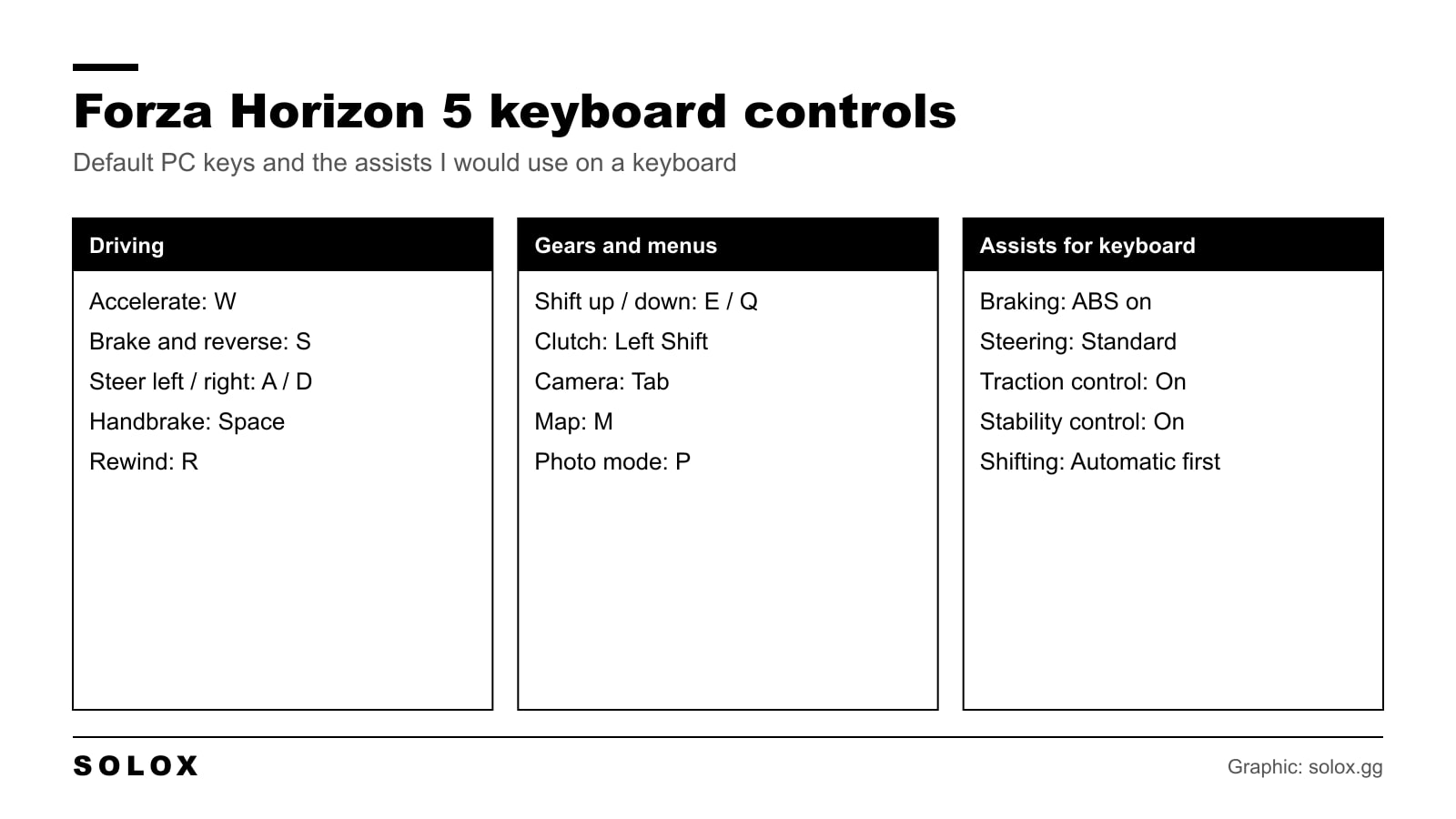
You can play Forza Horizon 5 on a keyboard. It is an arcade game with good assists, so it is one of the easier driving games to play without a pad or a wheel.
Here are the default keys, what I would change, and the assists to use.
Forza Horizon 5 default keyboard controls
| Action | Default key |
|---|---|
| Accelerate | W |
| Brake and reverse | S |
| Steer left | A |
| Steer right | D |
| Handbrake | Space |
| Shift up | E |
| Shift down | Q |
| Clutch | Left Shift |
| Rewind | R |
| Switch camera | Tab |
| Horn | H |
| Activate (start an event, confirm) | Enter |
| Activate ANNA | C |
| Map | M |
| Photo mode | P |
| Pause and menu | Esc |
I checked this list on 5 October 2026 against two key references, DefKey and Gamepressure. Both show the same layout.
It is the main set, not every key in the game. The Controls screen has more actions, like looking around, the radio and telemetry. If you want one of those, look at your own Controls screen, because those are the keys people most often change.

How to change the keys
- Press Esc and open Settings.
- Go to Controls.
- Select the keyboard and change the layout from the default to a custom profile.
- Select an action, press Enter and then the new key.
- Save the profile.
The default layout cannot be edited. That is the step people miss. You have to switch to a custom profile first, and then every action opens up.
The layout I would use
The default is good. WASD is where your left hand already sits, and I would not move the driving keys.
I would change three things.
| Action | Key I would use | Why |
|---|---|---|
| Steer, throttle, brake | W A S D (default) | One hand drives. Nothing to relearn from other games |
| Handbrake | Space (default) | Thumb. You can hold it and still steer |
| Shift up / down | Up / Down arrow | Only for manual. Gears go to the right hand, so the left only drives |
| Clutch | Leave it | Manual with clutch on a keyboard is one key too many |
| Rewind | R (default) | Close to the driving hand. You will use it a lot |
| Look back | Left Ctrl or a mouse button | Useful in races and Eliminator, and the little finger is free |
| Telemetry | T | Next to R. Handy when you tune |
The idea is the same I use in every game. One hand drives and does nothing else. The other hand does the gears and the menus.
If you prefer the arrow keys for driving, that works too. Then move the gears to A and Z or to the mouse buttons. What I would avoid is gears on E and Q while you steer on A and D. You use the same three fingers for both, and you will miss a shift in the middle of a corner.
The best assists for a keyboard
On a pad you can press the trigger 30%. On a keyboard you cannot. The key is off or it is on. The game smooths the input a little for you, but the assists do most of the work.
They are in Settings, Difficulty.
| Assist | Setting | Why on a keyboard |
|---|---|---|
| Braking | Anti-lock on | The brake key is 0% or 100%. Without ABS the fronts lock every time |
| Steering | Standard | Assisted fights you in fast corners. Simulation is too nervous for a key |
| Traction control | On | The throttle key is 0% or 100% too. Without it a powerful rear wheel drive car just spins |
| Stability control | On | It catches the slide you cannot catch with two keys |
| Shifting | Automatic at first | Two fewer keys. Go to Manual when the rest is natural, it is faster |
| Driving line | Braking only | It shows the braking point, the hardest thing to judge with a key |
| Rewind | On | Free roam and races are long. One mistake should not cost you ten minutes |
Normally I tell people to take the assists off as soon as they can. On a keyboard I would keep ABS and traction control on. In a real car you learn the limit with your feet over years. A key gives you nothing to feel.
Each assist you turn off pays a few more credits per race. On a keyboard I would not chase that. You earn more by finishing first with the assists on. The full menu is in my FH5 difficulty settings.
How to drive it on a keyboard
- Tap, do not hold. Steer with short, quick taps. In a fast corner it is three or four small taps, not one long press.
- Brake in a straight line. Do the braking before you turn. With an all or nothing brake, braking and turning together is how you go wide.
- Lift before you brake. For a medium corner, often lifting off W for a moment is enough.
- Tap the throttle on exit. Two or three taps out of a slow corner are smoother than one hard press, even with traction control.
- Pick all wheel drive. An AWD car takes a full throttle input much better than a rear wheel drive one. On a keyboard it is the easy lap time.
- Use the handbrake only for hairpins and drifting. A short tap on Space, then back on the throttle.
For the tune itself, a softer and more stable car helps. More rear downforce and a lower rear differential acceleration setting forgive a rough input. I explain the menu in how to tune cars in Forza Horizon 5, and how to switch to manual is here for when you are ready.
Keyboard, controller or wheel
Honest answer: if you have a controller in the house, use it. The game is built around a pad. The triggers and the stick give you the half throttle and the half steering a keyboard does not have. My Forza Horizon 5 controller settings are here.
A wheel is fun in this game but it is not faster than a pad. If you have one, start from my FH5 wheel settings.
If the keyboard is what you have, it is fine for the campaign, the festival playlist and free roam. Where you will suffer is drifting and ranked racing against good pad players.
One more thing if the game stutters. A keyboard driver feels every dropped frame, because the taps are so short. Get a stable frame rate first with my Forza Horizon 5 graphics settings.
Moving to the new game? The keys are almost the same. See my Forza Horizon 6 keyboard controls.
FAQ
Can you play Forza Horizon 5 with a keyboard?
Yes. The PC version has a full keyboard layout and every key can be changed in a custom profile. With ABS, traction control and stability control on, it is very playable.
What are the default keyboard controls in Forza Horizon 5?
W to accelerate, S to brake and reverse, A and D to steer, Space for the handbrake, E and Q for the gears, Left Shift for the clutch, R to rewind, Tab for the camera and M for the map.
How do I change the keyboard controls in Forza Horizon 5?
Open Settings, then Controls, select the keyboard and switch to a custom profile. The default layout is locked. In the custom profile, select an action and press the new key.
How do I rewind in Forza Horizon 5 on a keyboard?
Press R. Rewind has to be on in Settings, Difficulty, and it does not work in online races.
What is the handbrake key in Forza Horizon 5?
Space by default. A short tap starts a drift or helps the car around a hairpin.
How do I shift gears on a keyboard in Forza Horizon 5?
Set Shifting to Manual in Settings, Difficulty. Then E shifts up and Q shifts down. With Manual with clutch you also hold Left Shift on every change.
Is Forza Horizon 5 hard on a keyboard?
Harder than on a pad, because every input is all or nothing. With the assists on, an all wheel drive car and short taps on the steering, you can win races against the AI.
Can I use a mouse to steer in Forza Horizon 5?
Not that I know of. I have not found a mouse steering option in the Controls menu. The mouse works in the menus and in photo mode.