
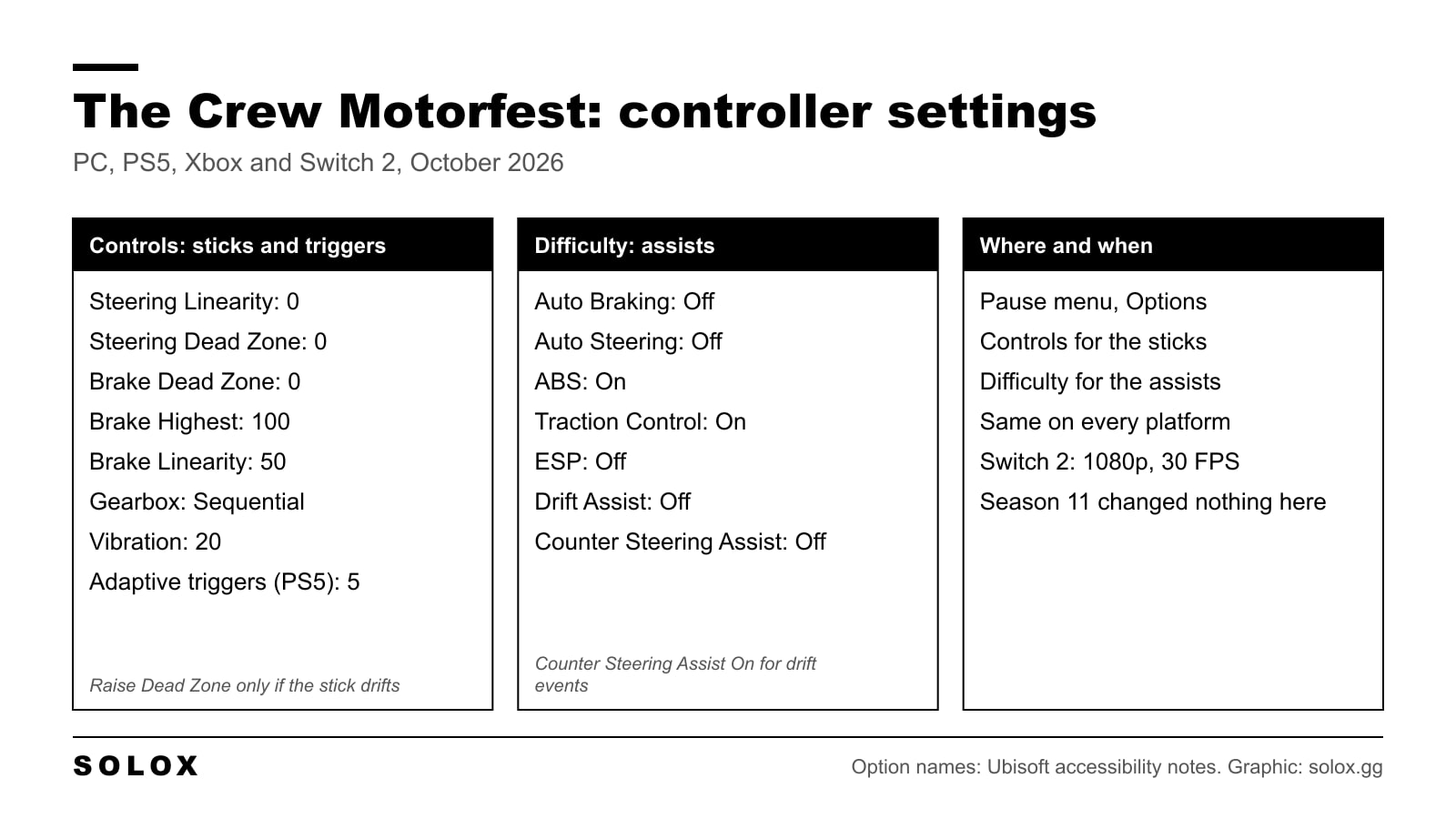
The short answer: steering Linearity 0 and Dead Zone 0, brake Dead Zone 0 with Highest 100, vibration around 20, adaptive triggers around 5, and Auto Braking, Auto Steering and ESP off. That takes the delay out of the stick and gives the car back to you.
The Crew Motorfest is a pad game first. The defaults are soft on purpose, so a new player does not spin at the first corner on Oahu. The price is a gap between your thumb and the front wheels. This page is how to close it.
I checked the option names on 10 October 2026 against Ubisoft's own accessibility notes and the current settings guides, after Season 11 went live. Where I could not confirm something, I say so.
The quick version
| Setting | Value |
|---|---|
| Steering Linearity | 0 |
| Steering Dead Zone | 0 |
| Steering Highest | 0 (see the note below) |
| Brake Linearity | 50 (default) |
| Brake Dead Zone | 0 |
| Brake Highest | 100 |
| Throttle | Default preset |
| Gearbox | Sequential |
| Vibration | 20 |
| Adaptive triggers (PS5) | 5 |
| Auto Braking | Off |
| Auto Steering | Off |
| ABS | On |
| Traction Control | On |
| ESP | Off |
| Drift Assist | Off, on if you only want to get through drift events |
| Counter Steering Assist | Off, on for drift events |
Where the settings are
Two menus, and the split catches people out. Open the pause menu and go to Options.
- Controls. Steering, throttle, brake, gearbox, button mapping, vibration and the triggers.
- Difficulty. Every driving assist. That includes Auto Braking and Auto Steering, which feel like controller settings but are not in Controls.
If you changed the sticks and the car still feels like it is driving itself, you are in the wrong menu. The assists are the bigger lever.
Steering
Ubisoft gives steering, throttle and brake the same tools: a preset, and three sliders called Linearity, Dead Zone and Highest (that is from the studio's accessibility notes). What Ubisoft does not publish is the scale behind each slider. So here is what is known and what is not.
Linearity 0. This is the one that removes the lag. At the default the car does very little for the first part of the stick travel, then a lot. At 0 the response is direct. The car will feel twitchy for ten minutes. Give it those ten minutes before you change anything.
Dead Zone 0. The dead zone is how far the stick moves before the game reads it. Zero only works on a pad that centres properly. If the car creeps to one side on a straight with your thumb off the stick, raise it a point at a time until the creep stops, and no further.
Highest 0. The settings players have passed around since launch put steering Highest at 0 and brake Highest at 100. I have not found an official line from Ubisoft on which end of that slider is the full range. So check it once, it takes ten seconds: in cockpit view, at walking pace, push the stick all the way to one side. If the wheel in the car does not reach full lock, move Highest to the other end.
If 0, 0, 0 is too sharp for you, raise Linearity first, a few points at a time. Leave Dead Zone alone unless the stick drifts.

Throttle and brake
Brake: Dead Zone 0, Highest 100, Linearity at the default of 50.
A trigger has about a centimetre of travel. You want all of it to mean something, and Dead Zone 0 does that. I leave brake Linearity at 50 because on a trigger a softer first half makes it easier to hold a part brake into a corner. If you want the brake to bite sooner, lower it.
Throttle: I leave it on the default preset. With Traction Control on, the throttle curve matters much less than the steering does. If a powerful rear wheel drive car lights up its tyres every time you touch the trigger, that is the moment to try a higher throttle Linearity.
Gearbox
Sequential. An automatic shifts up early out of slow corners and will not hold a gear through a long one, and holding a gear is half of driving a fast car smoothly.
If you only cruise, stay on automatic. It is the one setting here that is pure preference.
Vibration and adaptive triggers
Vibration around 20. The default rumble is strong enough to hide the useful part, which is the change you feel when the tyres start to slide. Lower it until that is what is left.
On PS5 the DualSense triggers push back under braking and on the limit. I keep that low, around 5. Higher and the brake trigger fights you, and in a long playlist your finger is tired before the last race. Turn both up if you like the feeling. It costs no lap time, only comfort.
An Xbox pad has no adaptive triggers, so vibration is the only feedback setting that matters on it.
The assists
This is the half of the setup that changes how the car drives. Ubisoft lists eight: Auto Braking, Auto Steering, Traction Control, ABS, Counter Steering Assist, ESP, Drift Assist and Airplane Handling Assist. There are also three difficulty presets, if you would rather not set them one by one.
| Assist | My setting | Why |
|---|---|---|
| Auto Braking | Off | It brakes for you before corners. You never learn a road with it on |
| Auto Steering | Off | It pulls the car toward the line. Same reason |
| ABS | On | On a trigger you cannot feel a wheel lock. Keep it |
| Traction Control | On | It catches the slide on exit. Try it off once you are comfortable, some players find launches quicker without it |
| ESP | Off | It is stability control. It steps in whenever the car rotates, and that makes the car dull |
| Drift Assist | Off | Turn it on if you do not enjoy drifting and only want the events done |
| Counter Steering Assist | Off | On for drift events only |
| Airplane Handling Assist | Your call | I have not flown enough in this game to give you a verdict |
Counter Steering Assist is the toggle. With it off the car goes where the stick points, which is what you want in a race. With it on the game helps you when the rear steps out, which is what you want in a drift event, where holding the angle is the whole job. Switch it before the event, not during.
If you are new, do not take everything off at once. ESP first. Then Auto Steering. Then Auto Braking. One change, a few races, then the next. That is how I would do it with a young karting driver too: one thing at a time, or you never know which change did what.
PC, PS5, Xbox and Switch 2
The sliders and the assists are the same on every platform, so one set of values works everywhere. The pad is the only difference: adaptive triggers are a DualSense thing.
The Nintendo Switch 2 version came out on 8 October 2026. Ubisoft says it runs at 1080p and 30 FPS in TV mode and in handheld mode, with cross-progression and cross-save. I have not driven it on Switch 2 yet. At 30 FPS a very direct steering setting can feel more nervous than it does at 60, so if Linearity 0 is too much there, that is the first slider I would raise.
Season 11 and what it changed
Season 11 went live on 7 October 2026 and opened Year 4. It added Kauai, a free island built around off road driving, a winch on some vehicles, the Kauai Expeditions playlist and more than 20 cars, the Bugatti Tourbillon and the Lamborghini Huracan Sterrato among them.
Nothing in it changes the list of assists or the sliders above. What changes is the surface. On dirt, Traction Control on is worth more than it is on tarmac, so if you turned it off for the street playlists, turn it back on for Kauai.
Next step: my best cars in The Crew Motorfest page, and how to make money in The Crew Motorfest to pay for them. If you are selling to fund the garage, read how to sell cars first.
FAQ
What are the best controller settings for The Crew Motorfest?
Steering Linearity 0 and Dead Zone 0, brake Dead Zone 0 and Highest 100, vibration around 20, sequential gearbox, and Auto Braking, Auto Steering and ESP off. Keep ABS and Traction Control on.
Why does the steering feel delayed?
Because of the default steering curve and dead zone. Set steering Linearity and Dead Zone to 0 in Options, Controls.
Where are the assists in The Crew Motorfest?
In Options, Difficulty. They are not in the Controls menu.
Is Counter Steering Assist good?
For drift events, yes. For racing, no. It helps you catch the rear, which holds a drift and gets in the way on a race line.
Are the settings the same on PS5, Xbox and PC?
Yes. Only the adaptive triggers setting is specific to the PS5 DualSense.
Should I turn Traction Control off?
Not at first. On a pad it saves more time than it costs. Try it off later, on tarmac, one car at a time.
Is The Crew Motorfest on Switch 2?
Yes, since 8 October 2026. Ubisoft says it runs at 1080p and 30 FPS, in TV mode and handheld.