
You can play F1 2021 on a keyboard. It is not the fast way, but it works, and with the right assists you can finish a career season without a wheel or a pad.
Here are the default keys, how to change them and how I would set the game up for a keyboard.
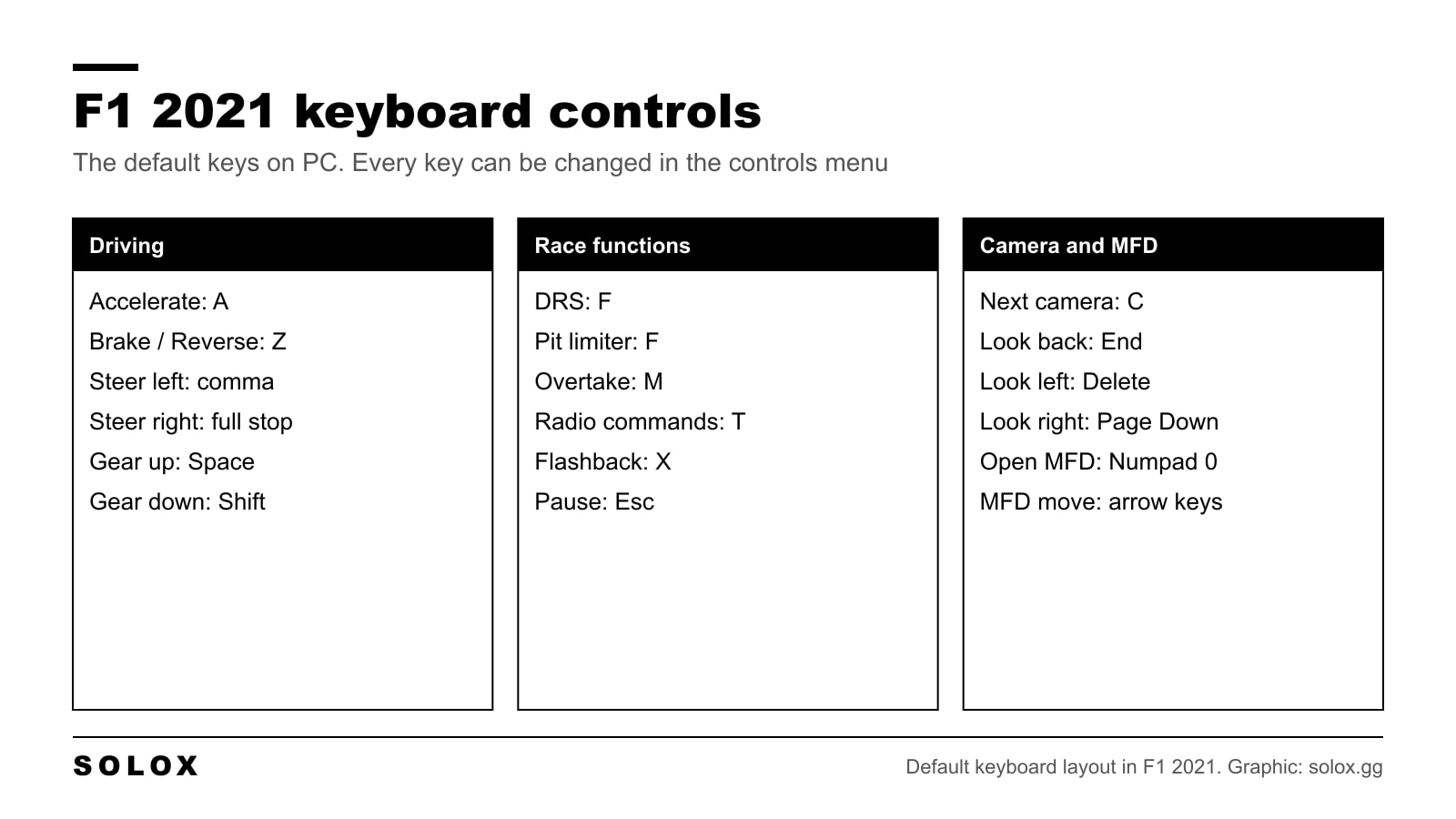
F1 2021 keyboard controls list
These are the default keys on PC.
Driving
| Action | Key |
|---|---|
| Accelerate | A |
| Brake / Reverse | Z |
| Steer left | , (comma) |
| Steer right | . (full stop) |
| Gear up | Space |
| Gear down | Shift |
| Clutch | Space |
Race functions
| Action | Key |
|---|---|
| DRS | F |
| Pit limiter | F |
| Overtake (ERS) | M |
| Radio commands | T |
| Replay / Flashback | X |
| Push to talk (multiplayer) | S |
| Pause | Esc |
Camera
| Action | Key |
|---|---|
| Next camera | C |
| Look forward | Home |
| Look back | End |
| Look left | Delete |
| Look right | Page Down |
Multi function display
| Action | Key |
|---|---|
| Open the MFD | Numpad 0 |
| MFD up | Arrow up |
| MFD down | Arrow down |
| MFD left | Arrow left |
| MFD right | Arrow right |
In the menus you move with the arrow keys, confirm with Enter and go back with Esc.
The game has two keyboard presets. If your keys do not match this list, look at which preset is selected in the controls menu.
How to change the keyboard controls
- Open Settings from the main menu or the pause menu.
- Go to Controls, Vibration and Force Feedback.
- Select the keyboard and press Edit.
- Pick an action, press the new key and save the scheme under a name.
The default layout splits the car between two hands: throttle and brake on the left, steering on the right. That is a good idea, and I would keep it. One hand does the pedals, the other does the wheel, like in a car.
If you do not like A and Z, a layout many people find easier is this one.
| Action | Key |
|---|---|
| Steer left / right | Arrow left / Arrow right |
| Accelerate | A |
| Brake | Z |
| Gear up / down | Arrow up / Arrow down |
| DRS | Space |
| Overtake | Shift |
| MFD | Numpad keys |
If you move the MFD away from the arrow keys, give it four other keys. You need it in the race for the front wing and the brake bias.
The assists to use on a keyboard
A pedal goes from 0 to 100. A key is 0 or 100 and nothing in between. Every time you press A, you ask for full throttle. Every time you press Z, you ask for full brakes. An F1 car does not accept that without help.
| Assist | Keyboard setting | Why |
|---|---|---|
| Traction control | Full | Full throttle from a key spins the rear tyres |
| Anti lock brakes | On | Full brakes from a key lock the fronts |
| Gearbox | Automatic | Fewer keys to think about |
| Braking assist | Off | It brakes too early and makes you slow |
| Steering assist | Off | It fights your inputs |
| Dynamic racing line | Corners only | Shows the braking points |
| ERS assist | On | One key less in the race |
| DRS assist | On | One key less in the race |
When the keys feel natural, set the gearbox to Manual and the DRS assist to Off. Keep traction control and anti lock brakes. On a keyboard those two are not a crutch. They replace the pedal travel you do not have.
What every option does is in my F1 2021 assists and AI difficulty guide.
How to drive fast on a keyboard
Tap, do not hold. Five short taps on the steering key give you a gentle turn. Holding the key gives you full lock. In a fast corner like the first sector at Silverstone, you steer with taps.
Tap the throttle on the exit. Out of a slow corner, tap A three or four times before you hold it. Even with traction control on Full, the car goes forward better.
Brake early and in a straight line. You cannot release the brake slowly with a key, so you cannot carry the brakes into the corner like on a pedal. Brake a little earlier, finish braking, then turn.
Stay off the kerbs. Some kerbs in this game spin the car, and on a keyboard you do not have the fine steering to catch it.
Lower the AI. Find your level in time trial, then set the AI so you can race it. There is nothing to learn from being lapped.
Can you be fast on a keyboard?
You can be consistent, and you can win against the AI at a sensible difficulty. You will not match a good pad or wheel driver over a lap, because you lose time in every braking zone and every corner exit.
If you enjoy the game, a pad is the first upgrade, and it does not cost much. My F1 2021 controller settings are a good start, and controller vs wheel in F1 2021 explains what each step gives you.
Next steps
- On a pad: F1 2021 PlayStation controls and F1 2021 Xbox controls.
- A stable car helps on a keyboard more than anywhere else. Start from my F1 2021 setups.
- The driving basics: F1 2021 tips.
FAQ
What are the default keyboard controls in F1 2021?
A to accelerate, Z to brake, comma and full stop to steer, Space for gear up, Shift for gear down, F for DRS and the pit limiter, M for overtake and X for flashback.
Can I use the arrow keys or WASD to drive?
Yes. Every key can be changed. Go to Settings, Controls, Vibration and Force Feedback, select the keyboard, press Edit and bind the keys you want.
How do I open the MFD on a keyboard?
Numpad 0 opens the multi function display. The arrow keys move through it. On a keyboard without a number pad, bind the MFD to another key.
How do I use DRS on a keyboard?
Press F in a DRS zone when the game shows that DRS is available. With the DRS assist on, the game opens the flap for you.
Which assists should I use on a keyboard?
Traction control on Full and anti lock brakes On. A key is full throttle or full brakes, and the car needs those two assists to handle it.
Is a keyboard better than a controller for F1 2021?
No. A controller has analogue triggers and a stick, so you can use half throttle and small steering angles. A keyboard cannot do that.