
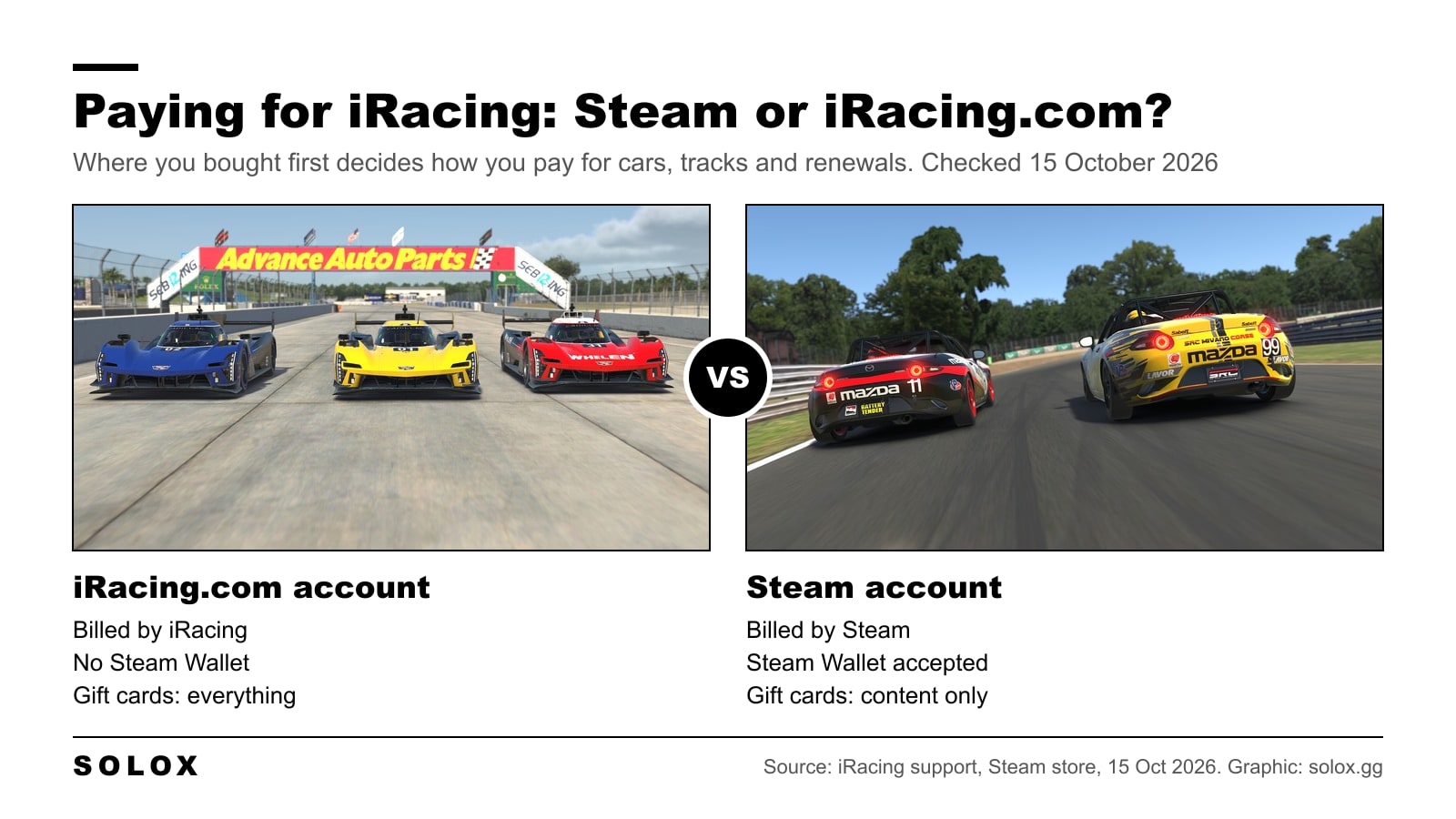
Yes, you can pay for iRacing cars, tracks and the membership with Steam Wallet. But only if your iRacing account was created on Steam. If you bought iRacing on iRacing.com, Steam cannot pay for anything on that account, even after you link a Steam key. The store you bought from first decides who bills you, for good.
Checked on 15 October 2026 against the iRacing Steam store page (app 266410), the Steam Refunds policy and Steam Wallet page, and these iRacing support articles: "Can I renew my direct iRacing account through Steam?" (modified 4 August 2026), "How much does it cost to use iRacing?" (10 September 2026), "Using iRacing Credits / Dollars" (17 March 2026), "How to Generate a Steam Key" (7 August 2025), "How to unlink a Steam key" (9 September 2025), "Can I get a refund or trade cars and tracks?" (16 May 2018), plus the iRacing Gift Cards page on iracing.com. Where iRacing has not published something, I say so.
The short answer
| Your account | Who bills you | Steam Wallet | Where you buy cars and tracks |
|---|---|---|---|
| Bought on Steam | Steam | Yes | Inside iRacing, paid through Steam |
| Bought on iRacing.com | iRacing | No | Inside iRacing or on iRacing.com, paid to iRacing |
iRacing's support article puts it plainly: Steam and iRacing have two completely separate purchasing processes. iRacing cannot even see what you paid to Steam.
So find out which account you have before you top up anything.
Step 1: Check which account you have
If you don't remember where you paid for the first month, these are the tells.
- You created the account by buying iRacing on the Steam store. That is a Steam account. Steam billed you, and the payments are in your Steam purchase history.
- You signed up on iRacing.com and later added iRacing to your Steam library with a key. That is a direct account with a Steam key linked. The key only gives you the Steam library entry, play time and the overlay. Billing stays with iRacing.
One more clue: a direct account can unlink its Steam key from the My Info page on the members site. iRacing says that option is not available on accounts created through Steam.
Step 2: If you have a direct account, Steam will not work
This is the mistake that costs people money.
Linking Steam to a direct iRacing account does not let you pay with Steam. iRacing's "How to Generate a Steam Key" article says that any purchases made through Steam for a direct iRacing account will not apply to your account, and that all purchases must be made through iRacing.
The renewal article is even louder about it, in capitals: you cannot renew an existing direct account through Steam, active or inactive, linked or not.
If you already did it by mistake and bought a Steam subscription for a direct account, iRacing tells you to request a refund from Steam. iRacing cannot fix it on their side because they cannot see Steam payments.
What you can do on a direct account is launch iRacing from Steam. The steps are in how to log into iRacing with Steam. Just know it changes nothing about billing.
Step 3: Add funds to your Steam Wallet
On a Steam account, iRacing is paid through Steam. Steam's own Add Funds page says your wallet balance can be spent on Steam games and within games that support Steam transactions. iRacing sells its cars and tracks that way, as in-game purchases.
You top up the wallet in the usual places:
- Steam store: the Add Funds to your Steam Wallet page, with any payment method Steam accepts in your country.
- Steam gift cards and wallet codes: redeem them on Steam and the value lands in your wallet.
Two things about the wallet that matter later. Steam refunds unused wallet funds only within 14 days of purchase, and only if they were bought on Steam. Wallet cards bought from a shop are outside that rule, because Steam does not refund purchases made outside Steam. So top up what you plan to spend, not more.
Step 4: Buy the membership on Steam
If you are new, this is where your account type gets fixed. Buy the subscription from the iRacing page on the Steam store and Steam becomes your billing company for that account.
This is what the Steam store page showed me on 15 October 2026, in euros. Steam prices are regional and these intro offers are only for new accounts, so expect different numbers in your country and on a different day.
| Plan | Intro price at checkout | Then renews at |
|---|---|---|
| 1 month | 11.21 euros (29% off) | 15.86 euros every month |
| 6 months | 59.93 euros (26% off) | 80.99 euros every 6 months |
| 12 months | 95.44 euros (29% off) | 134.54 euros every 12 months |
The Steam page also says accounts bought on Steam cannot be combined with accounts bought on iRacing.com. If you already have a direct account, buying on Steam creates a new, separate account. You do not want that. Your licence, iRating and cars stay on the first one.
If you are still choosing between the two stores, I compared them line by line in iRacing on Steam vs the website.
Step 5: Buy cars and tracks inside iRacing
You do not buy iRacing cars and tracks on the Steam store page. There are no DLC listings for them on Steam. The store page lists the content and says that anything not marked "Included" is an in-game purchase.
So you shop inside iRacing itself. Since the 2023 Season 4 Patch 3 build, iRacing has a cart in the application: you add cars and tracks from anywhere in the UI and check out without going to the website. Those release notes said the cart shows the estimated VAT or sales tax and how many iRacing Credits will be applied (as reproduced by Box This Lap; I could not open the original notes on support.iracing.com today).
On a Steam account, the payment for that cart goes through Steam, which is how your Steam Wallet gets used. iRacing has not published a step by step article with screenshots of the Steam checkout screen, so I am not going to invent one. What I can tell you is what changes on a Steam account at checkout:
- iRacing Credits apply automatically. The credits article (17 March 2026) says that on Steam based accounts the credits toggle isn't available. Credits are applied to your purchases and you cannot turn that off. There is no pop up, the total in the cart just drops.
- Tax is inside the Steam price. More on that in the price section below.
Before you buy anything, check what you already have. The base membership covers all the ranked Rookie series, and the list is in iRacing free cars list.
Step 6: Check the content arrived
After checkout, the car or track is licensed to your account. The download and install happen in the iRacing app like any other content.
If you register for a race and still see a "Content Required" button, read it as a checklist, not a payment failure. iRacing's support article on that message says official series need both the car and the track for that week. Buy the car without the track and you are still locked out.
How much do cars and tracks cost on Steam?
On iRacing.com, the support article "How much does it cost to use iRacing?" (modified 10 September 2026) gives the base content prices: additional cars are a one time $11.95, tracks are a one time $11.95 or $14.95 depending on the track. Sales tax or VAT goes on top at checkout.
Steam accounts pay a little more per item, and there is a reason. In the 2023 Season 3 Patch 3 release notes (13 July 2023), iRacing raised car and track prices for Steam accounts by up to $1.00 each. Direct accounts had tax added at checkout, but on Steam the tax is built into the price, so some direct customers were paying more than some Steam customers. The tiers they listed then:
| Direct price (before tax) | Steam price from July 2023 (tax included) |
|---|---|
| $14.95 | $15.95 |
| $11.95 | $12.95 |
| $4.95 | $5.25 |
| $2.95 | $3.25 |
That table is from 2023, as reproduced by Box This Lap and Traxion. I could not find a newer official price list for Steam accounts, and the Steam store page does not show per item prices because there are no DLC listings. Treat the cart in iRacing as the real price.
On regional pricing: Steam shows the membership in your local currency, as in my euro table. iRacing has published nothing on how it converts content prices for Steam accounts outside the US, so I won't guess.
Refunds: read this before you click buy
Two refund policies stack up here, and neither is generous.
iRacing's side. The support article is short. You cannot trade or return licensed content, cars and tracks. Once you own it, it stays on your account.
Steam's side. The Steam Refunds page says Steam offers refunds on in-game purchases in Valve developed games within 48 hours. Third party developers can opt in to the same terms, and Steam tells you at checkout if they have. Otherwise, in-game purchases in non-Valve games are not refundable through Steam. iRacing is not a Valve game, so look for that refund notice at checkout. If it is not there, assume the car is yours forever.
The subscription is different. Steam's policy lets you request a refund on a renewable subscription within 48 hours of the first purchase or of an automatic renewal, if you have not used it in the current billing cycle. So if a renewal caught you out and you have not driven since, ask straight away.
My rule with content: buy the car when you know which series you will run with it, and check you own that week's track. That one habit saves more money than any refund policy.
Gift cards on a Steam account
People mix up two different gift cards here.
Steam gift cards and wallet codes add money to your Steam Wallet. On a Steam iRacing account, that wallet can pay for the membership and for content.
iRacing gift cards are sold on iracing.com in any amount from $15 to $300. On a direct account they can pay for a membership, renewals and content. On a Steam account they cannot. The gift card page says Steam iRacing accounts can only use iRacing gift cards towards content or hosted sessions, not subscription purchases. All iRacing gift card sales are final.
So if you want to give someone on a Steam account their next year of iRacing, a Steam gift card is the one that works.
Should you use Steam to pay for iRacing?
If you have money in your Steam Wallet and no iRacing account yet, Steam makes sense. Check the Steam intro offer against the price on iRacing.com in your country, tax included, and take the cheaper first year.
If you already have a direct account, the answer is simple. You cannot use Steam to pay for it, so don't top up your wallet for iRacing.
My own view, for a sim most people keep for years: I would rather be billed by the company that runs it. You choose when to spend your credits, and support can see your payments. But the racing is identical on both, and nobody on the grid knows which store you used.
Whichever side you are on, both renew automatically. If you only want a month, see how to turn off auto renew in iRacing. For how credits and iRacing dollars work in general, read how to use iRacing dollars and credits.
FAQ
Can I use Steam Wallet funds to buy iRacing cars and tracks?
Yes, if your iRacing account was created by buying the membership on Steam. You buy the content inside iRacing and Steam handles the payment.
Can I pay for my iRacing.com account with Steam?
No. iRacing says purchases made through Steam do not apply to a direct account, and you cannot renew a direct account through Steam, even with a Steam key linked.
Are iRacing cars and tracks sold as DLC on Steam?
No. There are no DLC listings on the Steam store. The page lists the content and calls everything not included with the membership an in-game purchase.
Can I get a refund on an iRacing car bought through Steam?
iRacing does not refund or trade cars and tracks. Steam does not refund in-game purchases in non-Valve games unless the developer has opted in, which Steam shows at checkout.
Can I use an iRacing gift card on a Steam account?
Only for content and hosted sessions. On a Steam account an iRacing gift card cannot pay for the subscription. Use a Steam gift card for that.
Can I move my Steam iRacing account to iRacing.com?
You cannot do it yourself, and the Steam store page says the two account types cannot be combined. Contact iRacing support before you buy anything on the other side.