
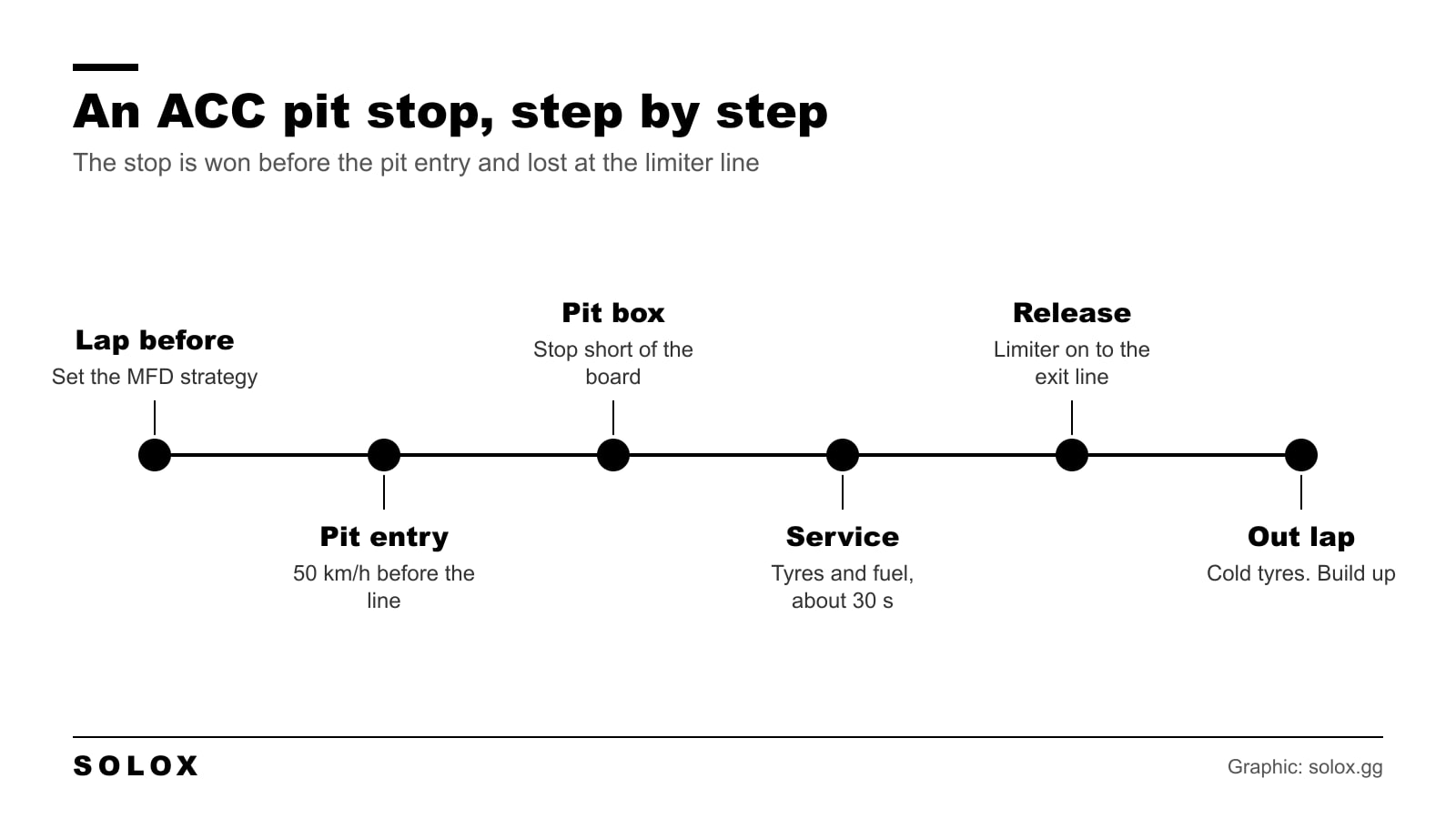
A pit stop in ACC is the easiest place to lose ten seconds without making a single driving mistake. Wrong tyres selected, limiter pressed late, car parked past the box.
The stop itself is automatic. Your job is everything before and after it.
The stop, step by step
- A lap before: open the MFD on a straight and set the pit strategy. Fuel, tyres, pressures.
- Pit entry: brake in a straight line and get down to 50 km/h before the limiter line. Then press the limiter. The default key is Alt+L.
- Pit lane: stay in first gear on the limiter. Your box is marked.
- The box: stop just short of the stop board.
- Service: the crew does what you selected. You wait.
- Release: drive off on the limiter and keep it on until you pass the exit line.
- Out lap: the tyres are cold and the pressures are low. Give it a lap.
The limiter does not slow the car down. It only stops it from going faster. If you arrive at 70 and press it on the line, you are speeding.
The pit menu on the MFD
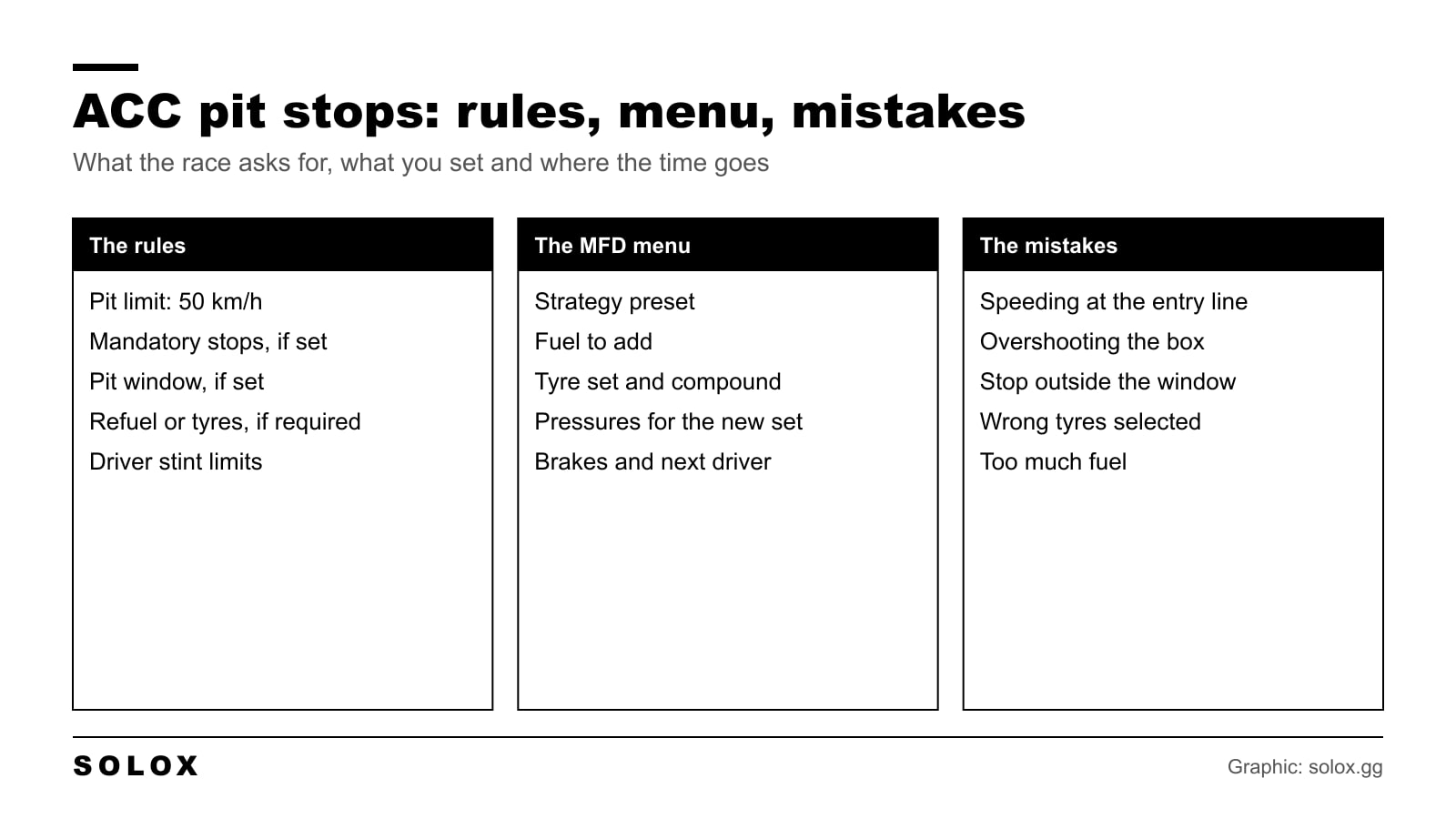
Press Insert to open the MFD and go to the pit strategy page. The arrow keys move through it. Put these on wheel buttons, because you will use them at 250 km/h. The keys are in ACC keyboard shortcuts and the rest of the screen is in the ACC HUD guide.
| MFD item | What it does | What I would do |
|---|---|---|
| Pit strategy | Loads one of the presets you saved in the setup | Build them before the race: one dry, one wet, one fuel only |
| Fuel to add | Litres that go in at the stop | Enough for the rest of the race plus one lap. No more |
| Change tyres | Tyres on or off for this stop | Off in a short race with no rule. A tyre change is slow |
| Tyre set | Which set of slicks goes on | A new set. A used set keeps its wear |
| Compound | Dry or wet | Check it twice when the weather is changing |
| Pressures | Cold pressures of the new set | Adjust for how the track temperature has moved |
| Change brakes | New pads and discs | Only in very long races. It adds a lot of time |
| Next driver | Who gets in, in team races | Set it early. A missed swap can break the stint rules |
The presets are the part most people skip. You build them in the setup screen, on the strategy page, before the race. Then in the race you pick one with two presses and you are done.
How long a stop takes
A normal service with tyres and fuel takes about 30 seconds by default. Add the time driving down the pit lane at 50 km/h, which is different at every track.
What makes it longer:
- Repairs. Bodywork and suspension damage add time, sometimes a lot.
- Brakes. A brake change is long. Only for endurance races.
- A driver swap.
- Overshooting the box. The crew pushes you back before they start.
What makes it shorter is doing less. In a 20 minute race with no mandatory stop, do not stop at all. In a race where you only need fuel, switch the tyre change off.
Mandatory stops and the pit window
Whether you have to stop, and what the stop needs, is set by the server or the race settings. Read the session info before the race.
| Server rule | What it means for you |
|---|---|
| Mandatory pit stop count | How many stops you must make. Zero means stops are optional |
| Pit window | A period in the middle of the race. The mandatory stop only counts inside it |
| Refuelling required | The stop only counts if fuel goes in |
| Tyre change required | The stop only counts if you change tyres |
| Driver swap required | The stop only counts with a driver change |
| Refuelling allowed | If off, you start with fuel for the whole race |
| Fixed refuelling time | Any amount of fuel takes the same time, so there is no gain in adding less |
| Driver stint time | The longest one driver can stay in the car without a stop |
When a mandatory stop is set, the HUD shows a small indicator that tells you whether you have done it. Do not trust your memory. Trust that indicator.
The classic trap: you pit one lap before the window opens. The stop does not count, and you have to come in again. The game shows a message when the window opens. Wait for it.
Server rules in general are in the ACC multiplayer guide.
Penalties and how to avoid them
| Mistake | What usually happens | How to avoid it |
|---|---|---|
| Over 50 km/h at the pit entry line | A penalty. A big overspeed can mean disqualification | Brake early. Be at 50 before the line, then press the limiter |
| Limiter off before the exit line | A penalty for speeding | Keep it on until you are past the board at the exit |
| Mandatory stop not done | A heavy penalty or disqualification at the end | Watch the pit stop indicator on the HUD until it shows as done |
| Stop made outside the window | It does not count. You have to stop again | Wait for the pit window message |
| Stop without the required fuel or tyres | It does not count | Check the MFD before the entry |
| Stint time exceeded | A penalty | Know the stint limit and plan the stops around it |
The entry line catches more people than anything else. You are still racing in your head, you brake a little late, and the speed is 58 when you cross. Brake earlier than feels natural. Two tenths lost at the entry is nothing next to a penalty.
A penalty you pick up in the pit lane is given to you after the pit exit, so you will not know you made the mistake until you are back on track.
When to pit
Three things decide it.
The fuel. Work out the litres per lap in practice. In the race, the car widget shows what is left.
The tyres. If the lap times drop by a second and the car slides on every exit, the set is finished. See the ACC tyre wear guide.
The traffic. Stopping early puts you on a clear track with new tyres, and you can jump the car ahead. That is the undercut. It works when you were stuck behind someone slower.
If rain is coming, the plan changes. Try to do the mandatory stop and the tyre change in one visit. I go through those calls in the ACC weather guide, and the wider race plan is in ACC race strategy tips.
Pressures for the new set
The new tyres go on cold. If the track has cooled since the start, the pressures that worked for the first set will come in low. If it has heated up, they will come in high.
Change the pressures of the next set on the MFD before you stop. The target does not change: 26.0 to 27.0 psi hot on slicks, 30.0 to 31.0 on wets. The method is in the ACC tyre pressure guide.
Practise it
Nobody practises pit stops, and it shows.
Start a single player race of 20 minutes with one mandatory stop. Do the whole thing: MFD on the straight, entry, box, exit. Three times. After that the stop is a routine and not an adventure.
FAQ
How do I pit in ACC?
Set the strategy on the MFD, slow to 50 km/h before the pit entry line, switch on the limiter and stop in your marked box. The crew does the rest.
What is the pit lane speed limit in ACC?
50 km/h. The limiter holds that speed, but you have to brake down to it yourself.
How do I turn on the pit limiter in ACC?
The default key is Alt+L. Most people map it to a wheel button.
How long does a pit stop take in ACC?
About 30 seconds for tyres and fuel by default, plus the time to drive through the pit lane. Repairs, brakes and driver swaps add more.
Why did my mandatory pit stop not count in ACC?
You stopped outside the pit window, or the stop did not include what the server requires, such as fuel, tyres or a driver swap.
How do I change tyres in the pits in ACC?
On the pit strategy page of the MFD, switch the tyre change on, then pick the set and the compound.
Why did I get a penalty in the pit lane in ACC?
Almost always for speeding at the entry or the exit. Be under 50 km/h before the line and keep the limiter on until you are past the exit.