
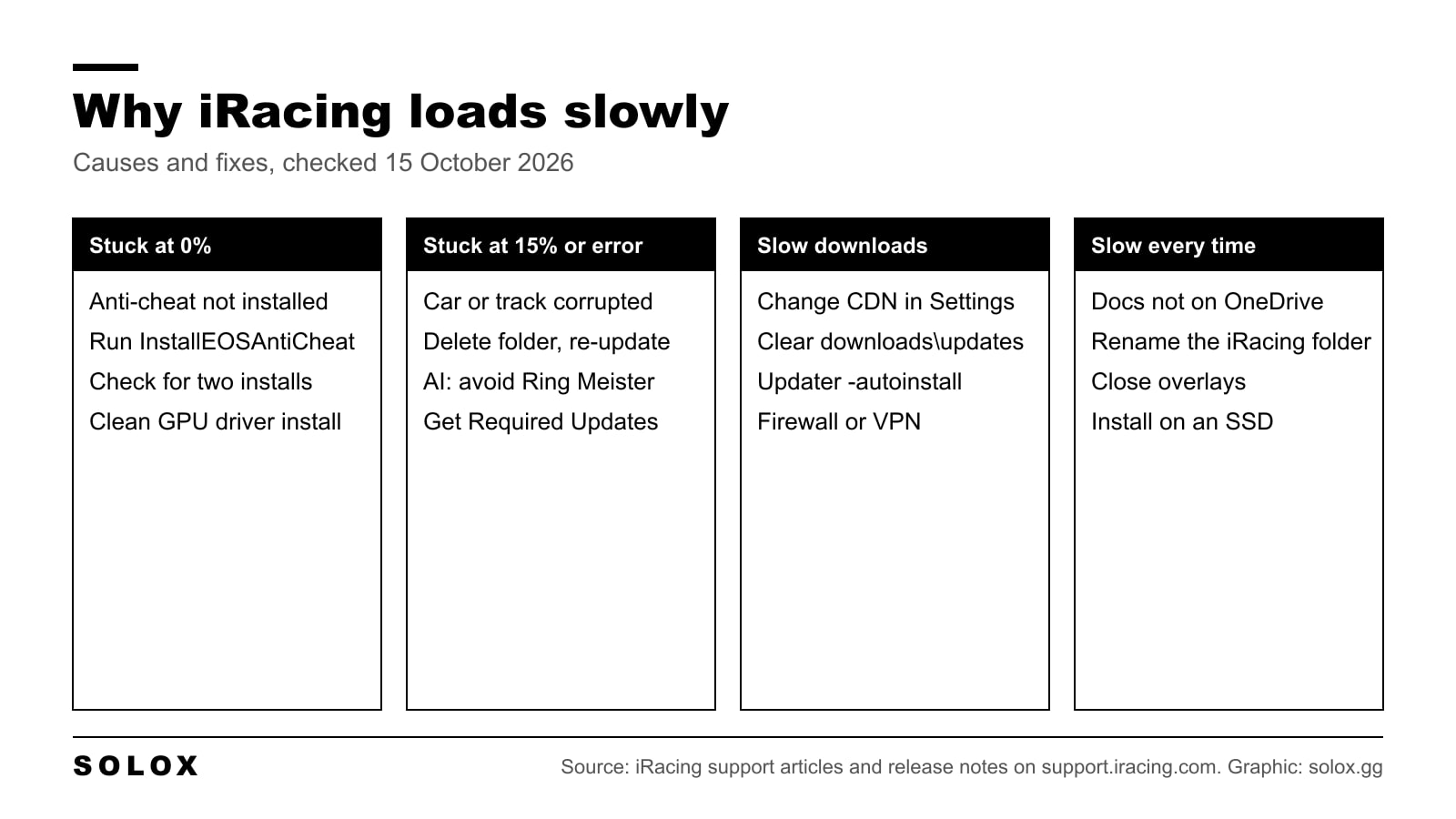
iRacing takes long to load for a short list of reasons. A car or track still needs an update or has a broken file. The anti-cheat is not installed properly. Something is fighting the sim for your Documents folder or your GPU. Or the content is coming off a slow disk. Each one has a fix, and iRacing's own support site covers most of them.
Checked on 15 October 2026 against iRacing's support articles Quick Troubleshooting Guide: Sim Won't Load (modified 7 October 2024), Quick Troubleshooting: Launching the iRacing UI (26 December 2025), Loading Error 71 (12 January 2024), AI Single Race stuck loading at 15% (6 September 2024), the EOS anti-cheat article (7 April 2025), Update Download CDN Options (13 February 2025), Waiting for iRacingService when Downloading Updates (13 June 2025), the iRacing System Requirements page, and the 2023 Season 4 and 2026 Season 4 release notes. Where iRacing has not published something, I say so.
Why iRacing takes so long to load
First, separate the two kinds of slow. One is a load that finishes but takes ages. The other is a load that stops at a percentage and never moves. The second one is a fault, and waiting longer will not fix it.
Here is the map I use. Find your symptom, then go to the section.
| What you see | Most likely cause | Where iRacing documents the fix |
|---|---|---|
| Sim hangs at 0% | Anti-cheat not installed or broken | Sim Won't Load guide, EOS anti-cheat article |
| AI race stuck at 15% | AI Opponents set to Ring Meister | AI Single Race stuck at 15% |
| Loading Error 71 or similar | Car or track outdated, failed update or corrupted | Loading Error 71 |
| "Get Required Updates" on a multiclass series | Files for the other cars missing | Mixed class series article |
| Downloads crawl or freeze | CDN, stuck updates folder, updater bug | CDN Options, iRacingService article |
| Every load is slow, no error | Documents on OneDrive, old configs, drivers, overlays, slow disk | Sim Won't Load guide |
Before any of this, iRacing's own first step is to check your PC meets the iRacing system requirements. It sounds obvious. It still catches people.
Car and track updates in the iRacing UI
iRacing does not ship as one fixed game. Every car and track is a separate download, and every season and patch updates some of them. If a single file in the session is out of date, the sim cannot load that session.
The loading errors are the clearest example. iRacing says Loading Error 71 happens when content, usually a car, is outdated, failed to update or is corrupted. Its fix:
- Open your install folder, normally
C:\Program Files (x86)\iRacing. - In
cars, deletecars.datandversion.txt. - Delete the
safetyfolder (that is the pace car). - Delete the folder of the car you were trying to drive. In a multiclass session, delete every car in that session.
- Launch iRacing, accept the updates and install the missing cars and the shared car data.
Multiclass catches a lot of people. iRacing says you need the files for every car in a mixed class series, including the ones you do not own, so the others can show on track. The red Update button handles it.
For AI races, iRacing has a separate article for a single race that sits at 15%. Its suggested workaround is to change the AI Opponents setting away from "Ring Meister". iRacing frames that as a suggestion, not a confirmed cause.
When the downloads themselves are slow
Big season updates can mean gigabytes, especially if you own a lot of content. iRacing's requirements page puts all cars and tracks at 225GB. So a slow line or a stuck download looks like a slow load.
Three official fixes:
- Change the CDN. iRacing serves downloads through a content delivery network. In the iRacing UI, go to Settings (the gear, bottom left), then Network, and pick a provider in the Content Delivery Network menu. The default is "No Preference".
- Clear the updates folder. If a download is stuck, iRacing says to empty
C:\Program Files (x86)\iRacing\downloads\updatesbefore you restart it. - "Waiting for iRacingService". For installs made before 11 June 2025 that own most or all content, iRacing documents an updater stall. The workaround is to run
iracingupdater -autoinstallfrom theupdaterfolder, or delete thedownloadsfolder and grab the Required Updates first.
If you are reinstalling, do not download everything again. iRacing's own advice is to copy the cars and tracks folders out first, reinstall, then put them back before you download. You may still need a small update.
The anti-cheat and launch steps
When the sim stops at 0%, iRacing points at the anti-cheat. The history matters here. In 2024 Season 2 Patch 4 iRacing removed EasyAntiCheat as its provider and went back to Epic Online Services (EOS). The folder in your install is still called EasyAntiCheat.
iRacing's current fix:
- Open the
EasyAntiCheatfolder in your install. That isC:\Program Files (x86)\iRacing\EasyAntiCheatfor direct accounts, orC:\Program Files (x86)\Steam\steamapps\common\iRacing\EasyAntiCheaton Steam. - Double-click
InstallEOSAntiCheat.bat. - Check iRacing is not installed in two places on your PC.
If the problem is the UI rather than the sim (black or white screen, nothing opens), iRacing has a separate list. Restart the iRacing service with Stop_iRacingService.bat and Start_iRacingService.bat in the install folder. Delete the iracing-electron folder in %appdata% to clear the UI cache. Turn off firewalls for a test, because the UI pulls some resources from the internet.
Disk type: HDD vs SSD
Here I have to be straight. iRacing's system requirements page lists storage as "Available Internal HDD Space": 40GB minimum, 225GB for all content. It does not mention SSDs, and iRacing has not published any load time numbers for an SSD versus a hard drive.
What I can tell you is how loading works on any PC. Track and car files have to come off the disk before you get to the grid. A hard drive reads them much slower than an SSD, and a full multiclass grid means more car files. So if your iRacing folder is on a spinning drive and every load drags with no errors, moving to an SSD is the upgrade I would make first. If you are planning a new machine, my sim racing PC guide covers what to buy.
Shaders and the first load after an update
People often say the first load after a new season or a new driver is the slowest. That fits how GPU drivers work: they build shaders the first time a game asks for them and keep them in a cache, and a driver update can throw that cache away.
But iRacing has not published anything about its own shader caching or first-load behaviour. I could not find a support article on it. So treat this as general PC behaviour and community experience, not an official iRacing explanation. The practical takeaway is simple. Judge your load times on the second load of the same car and track, not the first one after an update.
What iRacing does say is that its install changes every season. The 2026 Season 4 release notes, for example, list updated textures and shaders on several cars and tracks, including Road Atlanta. New content means new files to read.
Graphics settings and load time
Most graphics settings change your frame rate, not how long you wait at the loading screen. iRacing has published no load time figures for any graphics option, so be wary of anyone who says lowering shadows or crowds cuts loading by a set amount.
One setting is worth knowing about. In an official iRacing article (14 September 2010), iRacing explains that Uncompressed Car Textures turns off the texture compression the sim applies to car textures when it loads. The same article warns that uncompressed textures are much bigger and can overflow your video card's memory, which makes textures blurry. So it is a memory trade, not a speed trick.
If your GPU is near its limit, start with the VRAM figures on the requirements page: 6GB minimum, 8GB recommended, 10GB or more for high end. My iRacing graphics settings guide goes through the options one by one. In VR, check iRacing VR settings too, because VR loads the same content and then asks more of the GPU.
The Documents folder, replays and telemetry
Your configs, replays, setups and telemetry live in Documents\iRacing. iRacing's sim troubleshooting guide is specific about this folder:
- Do not redirect Documents to a non-default drive.
- Do not back it up to OneDrive. OneDrive and Windows "Controlled Folder Access" can both interfere.
- If the sim will not load, rename
Documents\iRacingtoiRacingbackup. The sim builds fresh config files at the next launch. Copy your setups and replays back afterwards.
Telemetry is worth a check. iRacing's own telemetry quickstart says a new .ibt file is written to Documents\iRacing\telemetry every time you enter the car once you arm recording with Alt+L. Leave it on all season and that folder grows.
Does a big replay or telemetry folder slow the sim's load? iRacing has not said so, and I did not find an official article that links the two. Clearing old files is a forum suggestion. It frees disk space, which matters if your drive is nearly full, but do not expect it to fix a stuck load. If you want to keep good races, my guide to saving iRacing replays shows where they go.
iRacing's own troubleshooting steps
This is iRacing's Sim Won't Load guide in order. Work down it and stop when the load comes back.
| Step | What to do |
|---|---|
| 1 | Update or reinstall your graphics driver. Tick "Clean Install" in the NVIDIA or AMD installer. It also resets GPU settings to default. |
| 2 | Rename Documents\iRacing to iRacingbackup so the sim rebuilds its config files. |
| 3 | Stuck at 0%: reinstall the anti-cheat with InstallEOSAntiCheat.bat. |
| 4 | Disable antivirus, firewalls and overlays for a test. Check OneDrive and Controlled Folder Access. |
| 5 | Unplug everything except mouse and keyboard: wheel, pedals, audio devices, VR headset. If it loads, plug them back one at a time. |
| 6 | Open Windows Reliability Monitor and look for errors around the failed launch in the last two weeks. |
| 7 | Email support@iracing.com with the problem, recent .dmp and .log files from Documents\iRacing, your dxdiag output and the Reliability Monitor details. |
Step 5 is the one people skip. A faulty USB device can stop the sim, and you only find it by unplugging. It is the same logic as chasing a fault on a real car: take things away until the problem goes, then put them back.
Has iRacing made loading faster?
Yes, at least once on record. The 2023 Season 4 release notes say iRacing "further improved load times" and rebuilt its memory allocation system "for improved loading times". The same notes say track loading for multiclass sessions improved by a factor based on the number of classes.
The 2026 Season 4 release notes make no load time claim. The big 2026 Season 4 engine change, Physics Islands, is about CPU load while you drive. I covered it in iRacing Physics Islands explained. It does not touch the loading screen.
FAQ
Why is iRacing stuck at 0% loading?
iRacing links a 0% hang to the anti-cheat. Run InstallEOSAntiCheat.bat in the EasyAntiCheat folder of your install and check you do not have iRacing installed twice. If that fails, do a clean graphics driver install and rename Documents\iRacing.
Why is my iRacing AI race stuck at 15%?
iRacing has a support article for this. Its suggested workaround is to change the AI Opponents setting away from "Ring Meister" when you build the race. If a car or track error shows, delete that content folder and update it again.
Does an SSD make iRacing load faster?
An SSD reads files much faster than a hard drive, so loads are quicker in general. iRacing itself does not recommend an SSD on its requirements page and has published no load time figures for one. If you have no errors and every load is slow on a hard drive, it is the first upgrade I would make.
How much disk space does iRacing need in 2026?
iRacing's requirements page says 40GB minimum and 225GB for all cars and tracks. Leave room on top of that for season updates, replays and telemetry.
Does OneDrive slow down iRacing?
iRacing tells you not to back up your Documents folder to OneDrive or move it to another drive, because it can interfere with the sim. Keep Documents\iRacing on the default local drive.
How do I reinstall iRacing without downloading everything again?
Copy the cars and tracks folders out of the install, uninstall, delete what is left, reboot and reinstall from the members site. Put the two folders back before you download anything. That is iRacing's own method.