
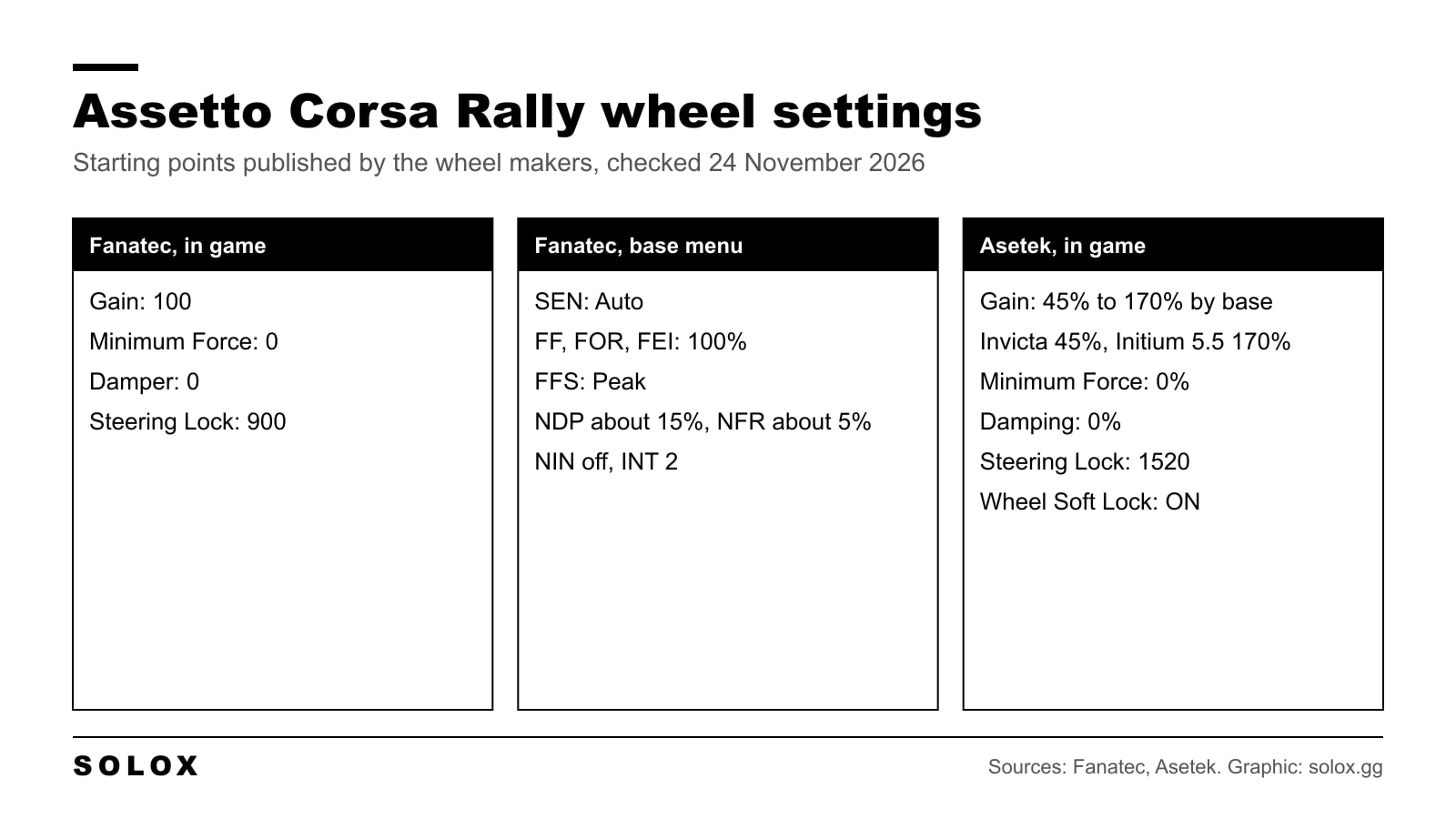
Two wheel makers publish official Assetto Corsa Rally settings: Fanatec and Asetek. Both put Minimum Force and in-game damping at zero and let the base do the work. Their values are below, read on their own pages on 24 November 2026, with the in-game menu and a method for every other wheel.
This is a supporting page of my Assetto Corsa Rally guide, which has the cars, stages, price and PC specs.
One warning first. Update 0.7 came out on 19 November 2026 and changed the force feedback (details below). Fanatec's guide was last updated in November 2025 and Asetek's on 29 October 2026, so both were written before it. Use them as a start, not as gospel, and I will update this page when either maker revises its values.
What update 0.7 changed in the force feedback
From the 0.7 patch notes on Steam:
- FFB is now normalized across cars. It is built to give real differences in steering weight between cars, scaled to the heaviest real steering without power assistance. So a light car will now feel light on purpose.
- Each car has its own FFB Gain, in Car Setup, Tyres. Use it for the one car that feels too heavy or too light, instead of moving the global Gain every time you change car.
- Gyroscopic and inertia effects are back, along with steer dampers and steer servo.
- New haptic vibration on the wheel when the tyres slip, and on the pedals if you have vibration motors on them. Fanatec pedals now vibrate when the wheels spin or lock.
- Reload the default car setups in the Service Park menu to get the new baseline. On a gamepad, reload the default input preset in the Input Options menu too.
My read: set the global Gain for your base once, then fix single cars with the per-car Gain. That is how I would use it.
Where the force feedback settings are
From the main menu: Settings, then Inputs, then Force Feedback. That path is from Asetek's guide and it is the same for every wheel.
The in-game force feedback options are:
| Setting | What it does |
|---|---|
| Gain | Overall force feedback strength sent to your wheel |
| Minimum Force | Adds force around the centre, to hide a weak spot on low end wheels |
| Damping | Adds resistance to the wheel turning |
| Steering Lock | Total rotation the game uses for your wheel |
| Wheel Soft Lock | Stops the wheel at the car's own lock |
Buttons and pedals are in the Input Bindings tab of the same Inputs menu. Click a control, then press the button or the pedal you want on it.
Fanatec settings
Fanatec's guide is written for its direct drive bases. Its idea: let the base give everything it has and tune the strength in game.
| Where | Setting | Fanatec value |
|---|---|---|
| Base | Sensitivity (SEN) | Auto |
| Base | FF | 100% |
| Base | FFS | Peak, if your base has it |
| Base | Natural Damper (NDP) | about 15% |
| Base | Natural Friction (NFR) | about 5% |
| Base | Natural Inertia (NIN) | Off |
| Base | Interpolation Filter (INT) | 2 |
| Base | FEI and FOR | 100% |
| Base | Spring (SPR) and Damper (DPR) | 100% |
| In game | Gain | 100 |
| In game | Minimum Force | 0 |
| In game | Damper | 0 |
| In game | Steering Lock | 900 |
Values from Fanatec, Best Fanatec Wheel Base Settings for Assetto Corsa Rally, read 24 November 2026.
Fanatec says SEN on Auto lets the wheel adapt to each car's steering rack. That matters more in rally than anywhere else, because the cars in this game use very different amounts of lock.
If it feels too strong or your arms get tired, Fanatec says to lower the in-game Gain first. If it lacks detail, raise Gain carefully or take damping off. I agree with that order. On gravel the wheel is moving all the time, and every bit of damping you add is a bit of the surface you stop feeling.
Asetek settings
Asetek publishes a RaceHub preset for each of its bases and a table of in-game values. Import the preset in RaceHub (Wheelbase, Force Feedback Settings, the three dots next to Preset, Import as new, then Save to wheelbase), then set the game:
| Base | Gain | Minimum Force | Damping | Steering Lock | Wheel Soft Lock |
|---|---|---|---|---|---|
| Invicta (27 Nm) | 45% | 0% | 0% | 1520 | ON |
| Forte (18 Nm) | 70% | 0% | 0% | 1520 | ON |
| La Prima+ (16 Nm) | 76% | 0% | 0% | 1520 | ON |
| La Prima (12 Nm) | 95% | 0% | 0% | 1520 | ON |
| Initium DD10+ (14 Nm) | 100% | 0% | 0% | 1520 | ON |
| Initium DD10 (10 Nm) | 120% | 0% | 0% | 1520 | ON |
| Initium+ (8 Nm) | 145% | 0% | 0% | 1520 | ON |
| Initium (5.5 Nm) | 170% | 0% | 0% | 1520 | ON |
Values from Asetek, Assetto Corsa Rally: RaceHub and Game Setup, updated 29 October 2026, read 24 November 2026.
Look at the Gain column. The stronger the base, the lower the Gain. Asetek is aiming every base at roughly the same force in your hands, and the weaker bases have to be pushed past 100% to get there. That is a useful way to think about any wheel: the right Gain depends on your torque, not on a magic number.
The Fanatec and Asetek locks differ (900 against 1520), but both makers leave the real lock of each car to the game: Fanatec with SEN on Auto, Asetek with Wheel Soft Lock on.
Logitech, Thrustmaster and MOZA
None of the three publishes Assetto Corsa Rally values today. I found single third-party guides, and they disagree with each other by a lot (one has Gain at 75 to 85, another at 125 for the same Logitech wheel). I do not print numbers I cannot back up, so here is the method I would use:
- Start from what both makers agree on. Minimum Force 0 and Damping 0 in game.
- Set the wheel's own software to full strength and do the tuning with the in-game Gain, the same way Fanatec and Asetek do.
- Turn Wheel Soft Lock on so the wheel stops where the car stops.
- Drive one gravel stage and look for clipping. If the wheel goes solid and silent in big compressions, Gain is too high. Lower it 5 at a time.
- On a gear or belt wheel with a dead centre, add Minimum Force in small steps until the dead spot is gone. Stop there.
For the Logitech RS50 specifically, Logitech has published base values per game, and I put the Assetto Corsa Rally row in my Logitech RS50 settings by game table.
Before your first stage
Rally is a different job for a wheel than a circuit. You turn further, you turn faster and you correct all the time. Two things matter more than any slider:
- A handbrake. You can bind one in Input Bindings. For hairpins it is not optional.
- The right car to learn in. My Assetto Corsa Rally car list says which one I would start with.
If you are still choosing between rally sims, my best rally sim page compares this game with EA Sports WRC and Richard Burns Rally. And if you want the same maker-backed approach for the circuit game, it is on my Assetto Corsa EVO FFB settings page.
FAQ
What are the best Assetto Corsa Rally FFB settings?
There is no single best. The two official starting points are Fanatec's (Gain 100, Minimum Force 0, Damper 0, Steering Lock 900) and Asetek's (Gain by base, Minimum Force 0%, Damping 0%, Steering Lock 1520, Wheel Soft Lock on). Start from the one closest to your wheel and tune Gain.
Where are the force feedback settings in Assetto Corsa Rally?
Main menu, Settings, Inputs, Force Feedback.
What steering lock should I use in Assetto Corsa Rally?
Fanatec uses 900 with SEN on Auto on the base. Asetek uses 1520 with Wheel Soft Lock on. Either way, the game limits each car to its own lock.
Why is my force feedback weak in Assetto Corsa Rally?
Check that your wheel's own software is not holding the force back, then raise the in-game Gain. Since update 0.7 some cars are meant to feel lighter than others; for one car, use its own FFB Gain in Car Setup, Tyres. Asetek's table shows how far a smaller base needs to go: 170% on the 5.5 Nm Initium.
Does Assetto Corsa Rally support my wheel?
The Steam page says the game supports direct input racing wheels and peripherals, plus triple screens. It is sold on Steam for PC.