
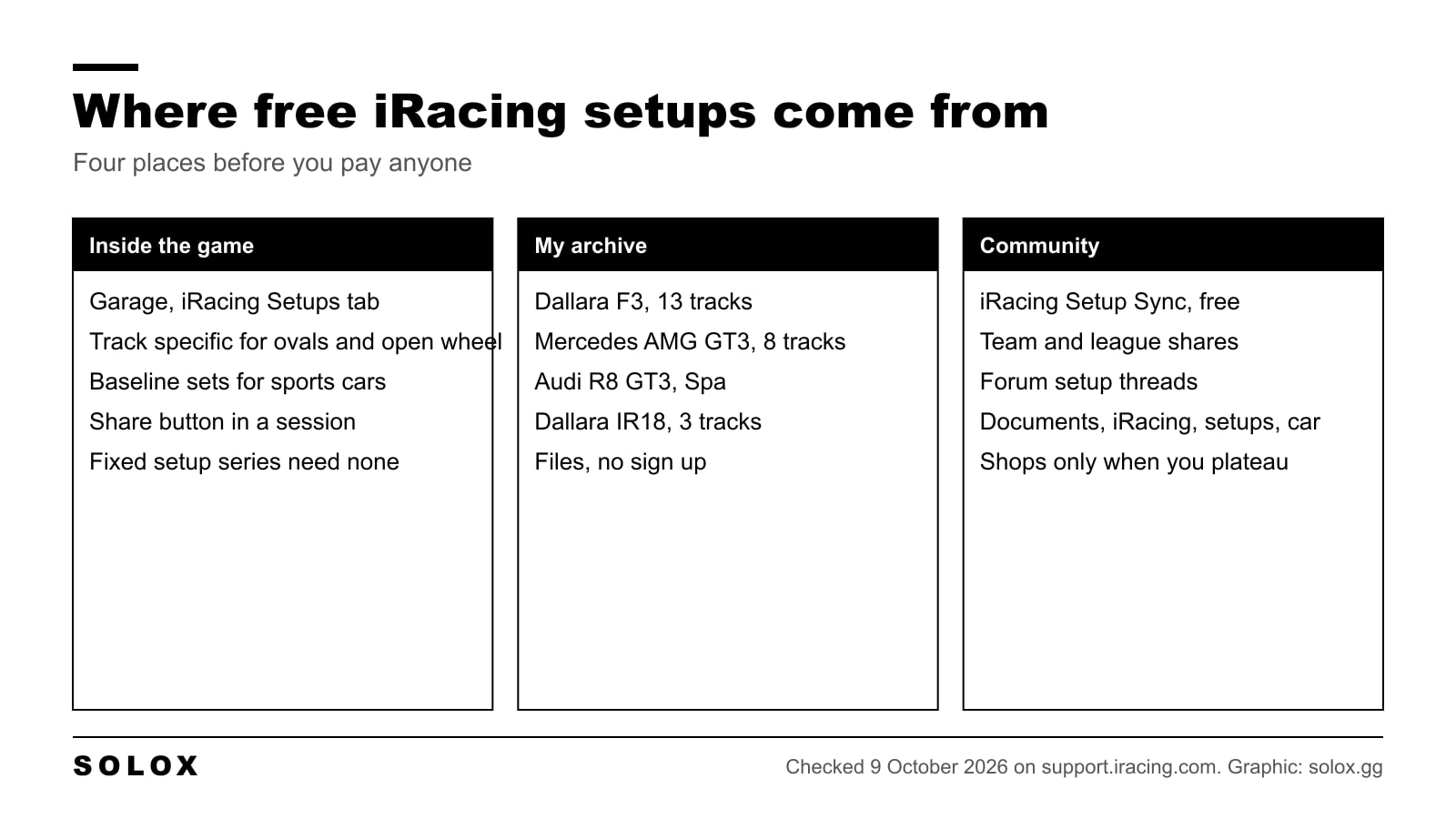
You do not need to pay for an iRacing setup to race. The game ships with free setups for every car, I give mine away on this page, and a free community tool pulls hundreds more into your garage. This page is where the free ones are, where the files go on your PC, and the one case where I think a paid setup is worth it.
I checked the iRacing side of this on 9 October 2026, on the official support articles. The driving advice is mine.
The free setups already in the game
Open any session, leave the car and click Garage. Under File Actions there are two tabs: My Setups and iRacing Setups.
The iRacing Setups tab is the one most people never open. iRacing says that most oval, dirt oval, prototype and open wheel cars have track specific setups there for the commonly raced tracks, and that sports cars have fewer, non specific sets. Many of them come with notes on when to use them and what to adjust.
For a GT3 or a Porsche Cup car that means a baseline that works everywhere and is not optimised anywhere. For an IndyCar or a Late Model it often means a set built for the exact track of the week. Load it, drive ten laps, and only then decide whether you need anything else.
There is a third free source inside the game: the Share button in the garage. It sends your current setup to the drivers connected to your session, team or club. If you race in a league, ask. Most leagues have one driver who builds setups and shares them in the practice session.
Where setup files go on your PC
When you install iRacing it makes a folder called iRacing in your Documents folder, with a setups folder inside it. The first time you drive a car, the game creates a subfolder with that car's name.
| What | Where |
|---|---|
| Setup files | Documents, iRacing, setups, then the car's folder |
| Load them in game | Garage, My Setups, pick the file, Open |
| Save your own | Garage, Apply, then Save As |
| Not sure which folder | Garage, My Setups shows the path at the top |
The one mistake everybody makes once: a setup file dropped in the setups folder itself, not inside the car's folder, does not appear in the game. If the car's folder does not exist yet, make it with the exact name the game uses, or just drive the car once in test mode and the game makes it for you. My how to install iRacing setups page walks through it with the folder names.
My free setups
These are files I built and ran. They are free, no sign up, and they are honest about their age: the Dallara F3 and GT3 sets date from 2022 and the tyre model and the GT3 balance of performance have moved since. They are a starting point you can trust, not a leaderboard setup.
| Car | Tracks | Where |
|---|---|---|
| Dallara F3 | Bathurst, Brands Hatch, Interlagos, Laguna Seca, Montreal, Monza, Nurburgring, Okayama, Road America, Sebring, Spa, Suzuka, Zandvoort | iRacing car setup archive |
| Mercedes-AMG GT3 | Brands Hatch, COTA, Daytona, Long Beach, Monza, Silverstone, Spa, Zandvoort | iRacing GT3 car setups |
| Audi R8 LMS GT3 | Spa | Audi R8 GT3 Spa setup |
| Dallara IR18 IndyCar | Laguna Seca, COTA, Daytona | iRacing car setup archive |
Each page has the file and the reasoning behind the main numbers, so you can adapt the set instead of copying it blind. The GT3 page also explains what I change to bring a 2022 set up to the current balance of performance.
What is coming next on this site: I am adding one car at a time, and the next ones are the cars with the most entries in the official series. The iRacing car list shows what I am picking from.
iRacing Setup Sync
iRacing Setup Sync is a free tool by Nick Thissen. It compares the setups you have on disk with a community database and downloads the ones you do not have for the car and track you are loading, so they appear in the garage without you touching a folder. Users upload their own sets and the setup threads of the forums feed it too.
Two warnings from me. First, a community set has no quality control, so run the official iRacing set first and only switch if the community one is faster for you over ten laps, not over one. Second, the tool writes into your setups folder, so if you keep your own files tidy, give them a name you recognise.
Fixed setup series: where setups do not matter
A lot of iRacing series are fixed setup. Everyone gets the same car, locked by iRacing, and the garage only lets you change a few things like brake bias or tyre pressures if the series allows it. A downloaded setup does nothing there.
Fixed series are where I would spend the first season, for two reasons. The lap time gap is the driver, so you learn, and you stop blaming the car. My fixed vs open setup series page lists which are which and how to read it in the schedule.

What I change first on any setup
Whatever set you load, free or paid, these four come first. One at a time, five laps each.
| Change | Why |
|---|---|
| Brake bias | Yours, not the setup builder's. If the rear locks before the front, move it forward half a percent |
| Tyre pressures | Check the hot pressures after five laps and bring the four corners to the same window |
| Fuel for the stint | A set that is loose on full tanks and tight on empty is set up for the wrong end of the race |
| Steering lock and wheel range | Match the car's range to the wheel. Nothing in the setup matters if the car turns more than your hands |
Only after those four would I touch springs, dampers or anti roll bars. My how to compare setups on iRacing page shows the garage trick for seeing two sets side by side before you change anything.
When a paid setup is worth it
When you have run the same car for a season, your lap times stop improving, and the gap to the top split is under a second. At that point a shop that updates every week for the track of the week saves you the hours you would spend building the set, and the datapacks with a reference lap teach you more than the setup does.
Before that, a paid setup hides your mistakes instead of fixing them. The shops I would look at, and what they charge, are on my best iRacing setup shops page, which I keep separate from this one on purpose: this page is the free route, that one is the paid route.
FAQ
Where can I get free iRacing setups?
In the garage under the iRacing Setups tab, from the free files on this site for the F3, GT3 and IndyCar, from the Share button in a session, and through the free iRacing Setup Sync tool.
Where do iRacing setups go?
Documents, iRacing, setups, then the folder with the car's name. Load them in the garage under My Setups.
Why is my setup not showing in the garage?
It is in the wrong folder. The file has to be inside the car's own subfolder, not in the setups folder itself. Garage, My Setups shows the exact path at the top.
Are the iRacing default setups good?
Good enough to race with, and for ovals and open wheelers often track specific. Run them before anything else. If you are slower than the top split with the default set, the setup is not the problem yet.
Do setups work in fixed setup series?
No. Fixed series lock the car for everyone. Only the few sliders the series allows, like brake bias, can be changed.
Are the SOLOX setups still up to date?
The F3 and GT3 files are from 2022. They load and they are safe to drive, but the GT3 balance of performance and the tyre model have changed since. The GT3 page explains what I adjust to bring them up to date.
Is iRacing Setup Sync safe?
It is a free community tool that copies setup files into your setups folder. It does not touch the game. The setups themselves have no quality control, so test them against the official iRacing set.