
Forza Horizon 6 is built for a controller, and the default setup is already good. Most of the lap time on a pad comes from three changes: smaller deadzones, the right assists and manual shifting.
If you play on PC without a pad, see my Forza Horizon 6 keyboard controls instead. The settings are in two menus. Deadzones and vibration are in Settings, Advanced Controls. Assists are in Settings, Difficulty. I go through both below.
One note on the values. They come from the published controller guides for this game, cross-checked against each other. Where the guides disagree, I give both numbers and tell you which one I would start with.
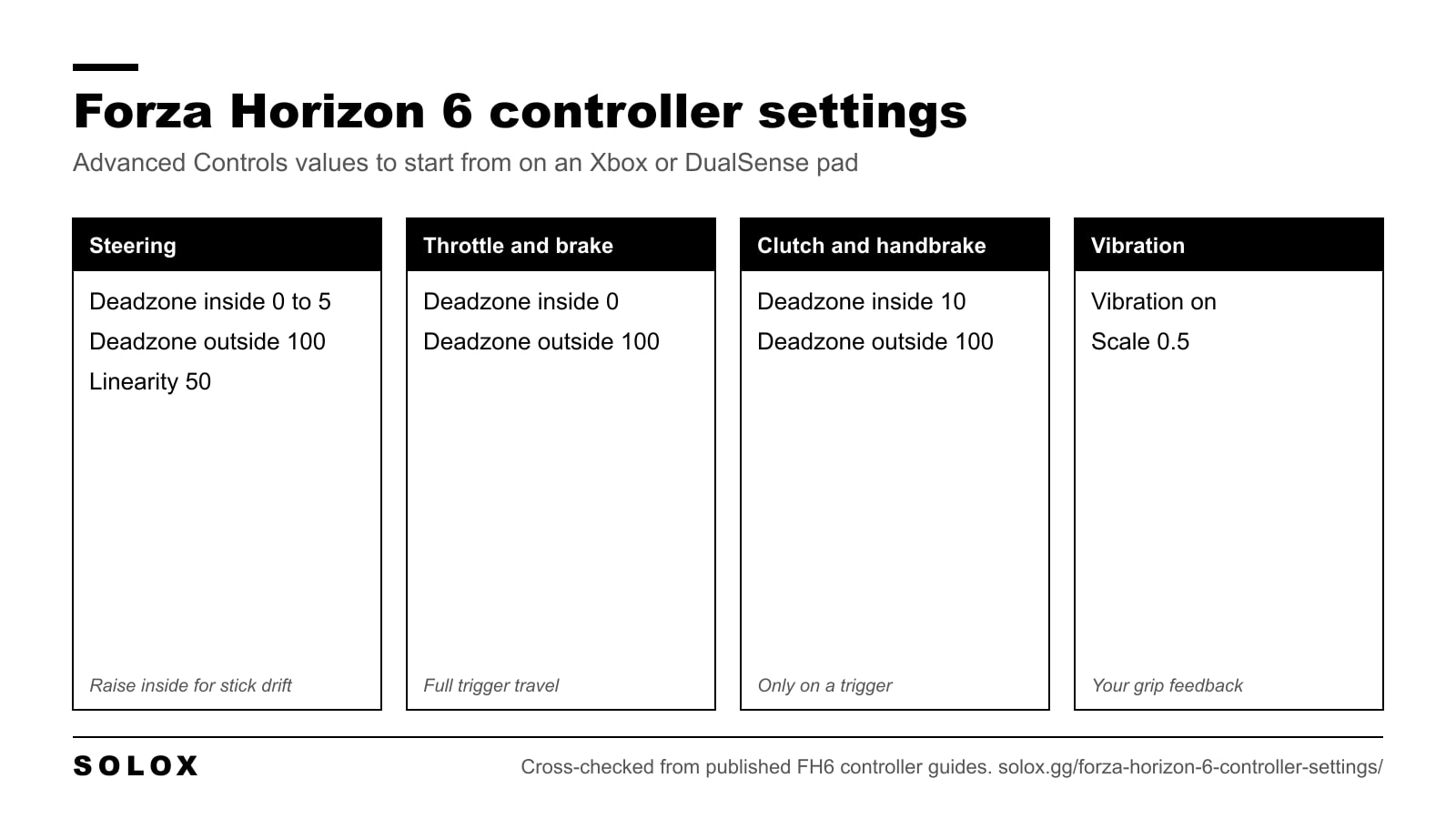
The quick version
| Setting | Value |
|---|---|
| Steering Axis Deadzone Inside | 0 to 5 |
| Steering Axis Deadzone Outside | 100 |
| Steering Linearity | 50 |
| Acceleration Axis Deadzone Inside | 0 |
| Acceleration Axis Deadzone Outside | 100 |
| Deceleration Axis Deadzone Inside | 0 |
| Deceleration Axis Deadzone Outside | 100 |
| Clutch Axis Deadzone Inside | 10 |
| Clutch Axis Deadzone Outside | 100 |
| E-Brake Axis Deadzone Inside | 10 |
| E-Brake Axis Deadzone Outside | 100 |
| Vibration | On |
| Vibration Scale | 0.5 |
Set these, drive ten minutes, then read the sections below for the two or three values worth adjusting to your pad.
Steering deadzones and linearity
Steering Axis Deadzone Inside is how far the stick has to move from the centre before the car steers. Lower is more direct. Start at 0 on a new pad or one with hall effect sticks. If the car wanders on a straight, the stick has drift, so raise the value one point at a time until the car holds a line. Most guides land between 0 and 5 for an Xbox or DualSense pad. Cheap third-party pads can need 6 to 10.
Steering Axis Deadzone Outside is where the game reads full lock. At 100 you use the whole stick travel. Dexerto runs 95, which gives full lock slightly earlier. SkyCoach and SCUF run 100. I would start at 100, because the extra travel gives you finer control in long corners, and drop to 95 only if a worn stick no longer reaches full lock.
Steering Linearity shapes the response in between. At 50 the response is linear: half the stick is half the steering. That is the value SkyCoach and SCUF use. Sportskeeda goes to 45 on an Xbox pad, and SkyCoach suggests 53 to 55 if you want a calmer car around the centre. Move it in steps of two or three and test at high speed on a motorway, where a twitchy stick shows up first.
The logic is the same as in a real car. You want the first degrees of input to be calm and predictable, because that is where you spend most of a fast corner.
Throttle and brake deadzones
Set Acceleration and Deceleration to 0 inside and 100 outside. The trigger then reacts as soon as you touch it and uses its full travel, which gives you the most room to modulate.
Two exceptions:
- If the car creeps or drags the brake with your fingers off the triggers, raise the inside deadzone to 2 to 5.
- SCUF sets the acceleration outside deadzone to 99. That guarantees full throttle on a trigger that does not quite reach the end of its travel. If your top speed looks low, check the throttle bar in telemetry. If it stops short of full, drop the outside deadzone a point or two.
Trail braking on a trigger is harder than on a pedal, because the travel is short. A 0 inside deadzone helps here more than anywhere else.
Clutch and handbrake deadzones
These only matter if the clutch or the handbrake is on an analog input. With the default layout they are buttons, and you can leave the values alone.
If you move either one to a trigger, use 10 inside and 100 outside. Sportskeeda uses those values for an Xbox pad and 5 to 10 for a DualSense. A small inside deadzone stops an accidental touch from slipping the clutch or dragging the handbrake.
Vibration
Leave Vibration on. On a pad it is the only feedback you get about grip. The rumble tells you when the front tyres start to slide and when the rear wheels spin.
Vibration Scale at 0.5 is the common value. Sportskeeda gives 0.4 to 0.5 for an Xbox pad and 0.5 to 0.6 for a DualSense. Go lower if your hands get tired in long sessions. I would not turn it off.
Assists for a controller
Assists are in the Difficulty menu, and they change the car more than any deadzone. Four of them also pay a credit bonus when you turn them down, which I cover in my Forza Horizon 6 difficulty settings page.
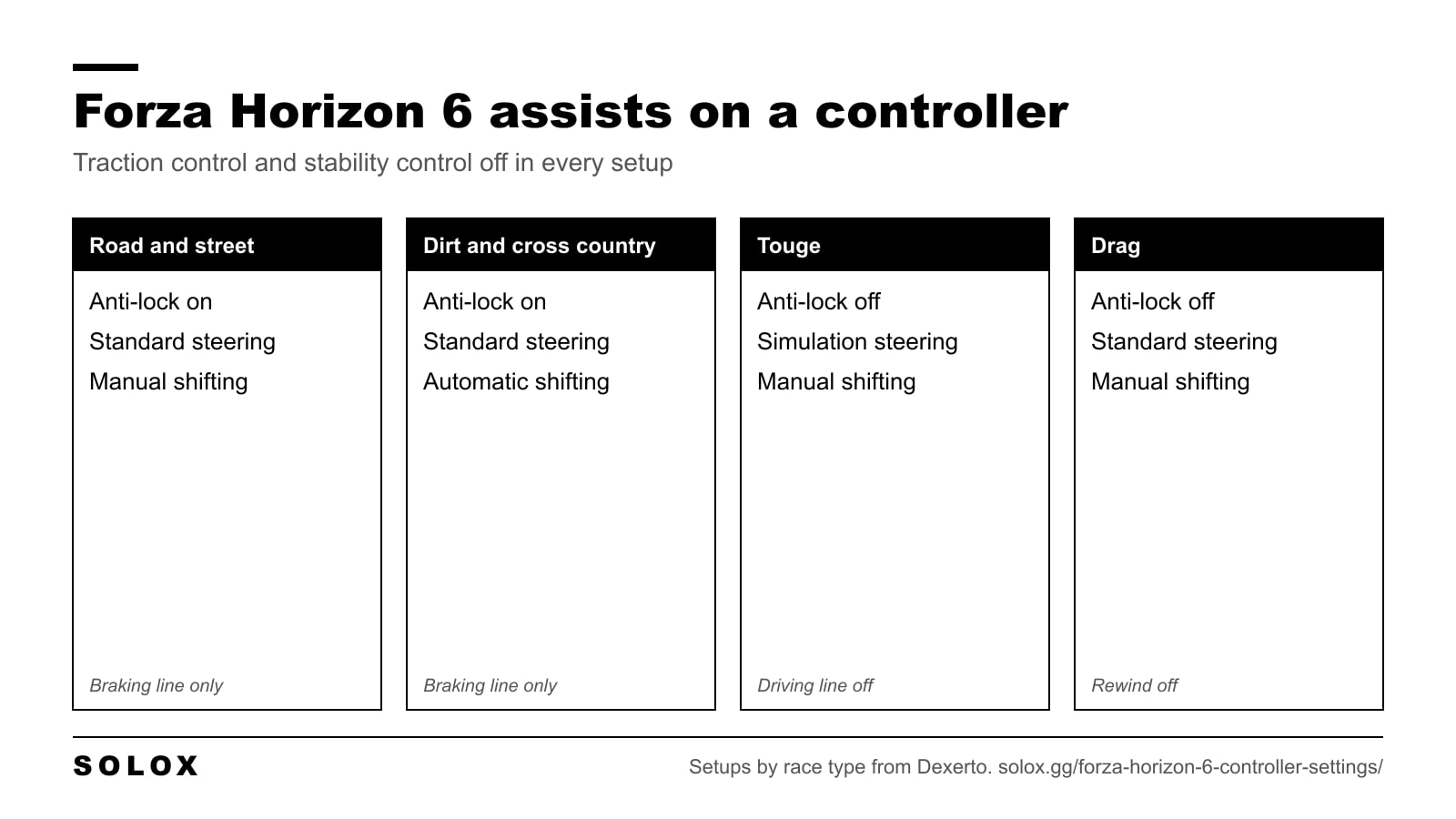
| Setting | Road and street | Dirt and cross country | Touge | Drag |
|---|---|---|---|---|
| Braking | Anti-Lock On | Anti-Lock On | Anti-Lock Off | Anti-Lock Off |
| Steering | Standard | Standard | Simulation | Standard |
| Traction Control | Off | Off | Off | Off |
| Stability Control | Off | Off | Off | Off |
| Shifting | Manual | Automatic | Manual | Manual |
| Driving Line | Braking Only | Braking Only | Off | Off |
| Rewind | On | On | On | Off |
That table follows Dexerto's setups by race type. Here is how I would use it.
Stability control off first. It cuts power and brakes individual wheels whenever the car rotates. That makes the car slower out of every corner, and it makes drifting impossible.
Traction control off second. With it on, the car bogs down on corner exit. Without it, you control wheelspin with the trigger. On a high-power rear-wheel-drive car that takes a few hours to learn. It is worth it.
Anti-lock brakes on. A trigger has very little travel compared with a brake pedal, so holding the limit without locking is difficult. I would keep ABS on for road racing on a pad and only turn it off for touge or drag, as in the table.
Manual shifting. Automatic shifts up early and shifts down late. Manual lets you hold a gear through a corner and pick the gear for the exit. Start with plain Manual. Manual with Clutch asks for an extra button press on every shift, and on a pad it is a lot to manage.
Driving line on Braking Only. The full line teaches you to stare at the road in front of the bonnet. Braking Only shows you the braking points and leaves your eyes free to look at the corner.
If you are new to the game, do not change all of this at once. SkyCoach's progression is a good one: start with ABS, traction control, stability control, automatic shifting and the full line on, then take them away one at a time.
Standard or Simulation steering on a pad
Stay on Standard. Standard steering is filtered for a thumbstick: it smooths your inputs and helps with countersteer. Simulation removes that help. It is the right choice on a wheel, which is why it is the first step in my Forza Horizon 6 wheel settings.
On a pad, Simulation makes the car sharper and much easier to spin. Dexerto recommends it for touge. Try it there if you want the challenge, with a Steering Linearity a few points above 50 to calm the centre of the stick.
Controller settings for drifting
The deadzones stay the same. The assists and the layout are what change.
- Stability Control off and Traction Control off. With either one on, the car will not hold a slide.
- Manual shifting, so the car stays in one gear through the whole drift.
- Steering on Standard. The countersteer help makes transitions easier on a stick.
- Steering Axis Deadzone Outside at 100, so you have the full stick range to hold the angle.
- Handbrake where you can reach it without taking your thumb off the stick.
The car matters more than the pad. My picks and the tuning basics are in the best drift cars in Forza Horizon 6.
Button layout
The default layout works. Change it only for a reason.
- Paddles. If your controller has back paddles, put shift up and shift down on them. Your thumbs then stay on the stick and your fingers on the triggers.
- Clutch. If you run Manual with Clutch, the usual choice is the clutch on A (Cross on a DualSense), with the shifts on paddles if you have them.
- Swap options. Advanced Controls has ready-made switches such as Switch Gear Up / Down and Switch E-Brake / Clutch. Use those before you build a custom layout.
Xbox pad or DualSense
Both work. The Xbox pad is the one the game is designed around, on console and on PC.
A DualSense works on PC as a normal controller. As far as I can find, the PC version has no native support for adaptive triggers, and players who want them use third-party tools. I would not buy a DualSense for this game on PC for that reason alone.
For values, Sportskeeda's only differences for the DualSense are a Steering Linearity of 48 to 50 and a slightly higher Vibration Scale of 0.5 to 0.6.
Fixing common controller problems
The car pulls to one side. Stick drift. Raise Steering Axis Deadzone Inside one point at a time.
The car never reaches top speed. The trigger is not reaching full throttle. Check telemetry, then lower Acceleration Axis Deadzone Outside to 98 or 99.
The steering feels twitchy at speed. Raise Steering Linearity by two or three points. Check that Steering is on Standard.
The car will not turn in tight corners. Check that Steering Axis Deadzone Outside is not below 95, then look at the car. Understeer on a pad is more often a tune or a tyre problem than a settings problem. The cars I would start with are in my best cars in Forza Horizon 6.
The game stutters and inputs feel late. That is frame rate, not the pad. See my Forza Horizon 6 best settings.
The rest of the game, from the map to the car list, is in my Forza Horizon 6 guide. If you still play the last game, the values there are in my Forza Horizon 5 controller settings.
FAQ
What are the best controller settings for Forza Horizon 6?
Steering Axis Deadzone Inside 0 to 5 and Outside 100, Steering Linearity 50, and throttle and brake deadzones at 0 inside and 100 outside. Keep Vibration on with Vibration Scale around 0.5.
What is the best steering linearity in Forza Horizon 6?
50 is the linear setting and the best starting point. Go down to 45 for a sharper response or up to 53 to 55 for a calmer car around the centre of the stick.
Should I use Simulation steering on a controller?
No, not for general racing. Standard steering is filtered for a thumbstick and is easier to control. Simulation is meant for wheels. Some players use it on a pad for touge.
What deadzone fixes stick drift in Forza Horizon 6?
Steering Axis Deadzone Inside. Raise it one point at a time until the car stops turning on its own. Most worn pads need between 5 and 10.
Should I turn off traction control and stability control?
Yes, once you are comfortable with the game. Both slow the car out of corners. Turn off stability control first, then traction control.
Is manual shifting faster on a controller?
Yes. You choose the gear for each corner exit, and the car does not shift up in the middle of a slide. Use plain Manual before you try Manual with Clutch.
Do the same settings work on Xbox and PC?
Yes. The Advanced Controls menu and the values are the same on Xbox Series X, Series S and PC.
Does Forza Horizon 6 support the PS5 DualSense on PC?
It works as a standard controller. As far as I can find, adaptive triggers are not supported natively on PC and need a third-party tool.