
The best Forza Horizon 6 settings depend on one thing: how much memory your graphics card has. Not the preset name, not the resolution. The game fills video memory fast, and once it is full the frame rate falls apart.
So this page is organised that way. Xbox first, because it is one choice. Then PC, by 8 GB, 12 GB and 16 GB cards.
I checked everything on 4 October 2026. The console numbers are official. The PC values come from community testing, mainly the GTPlanet optimisation thread, and I say where a value has only one source. I have not benchmarked these on my own machine.
The quick version
| Platform | What to set |
|---|---|
| Xbox Series X | Performance mode: 60 fps, dynamic resolution up to 4K |
| Xbox Series S | Performance mode: 60 fps at 1080p |
| PC, 8 GB card | High preset, textures High, ray tracing off |
| PC, 12 GB card | Ultra preset, ray tracing off or reflections only |
| PC, 16 GB card or more | Extreme preset, ray traced reflections High, ray traced GI Medium |
| Every PC | Dynamic resolution off, native anti-aliasing from your upscaler, frame rate cap at your monitor's refresh rate |
Best settings on Xbox Series X and Series S
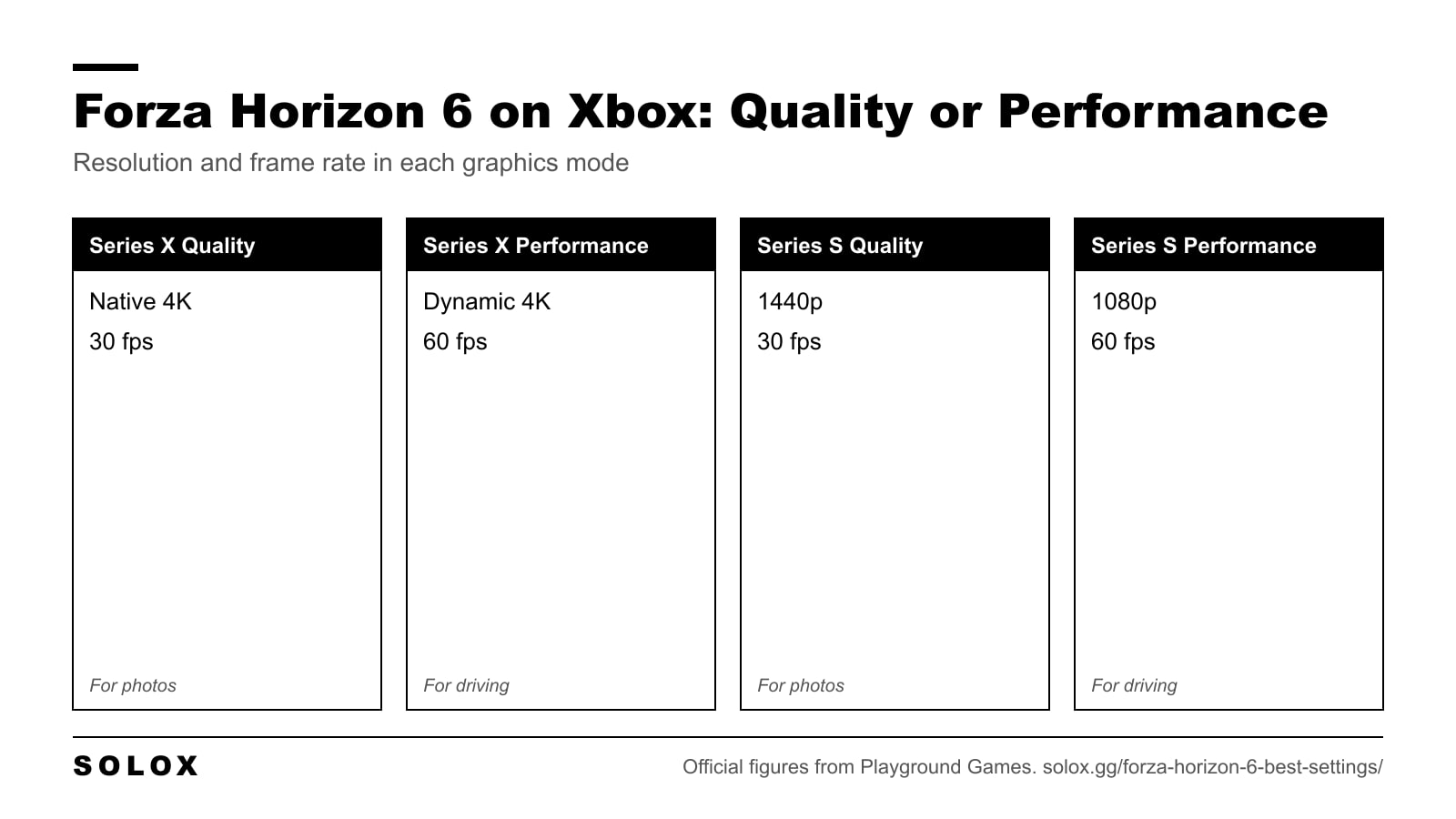
There are two modes on each console.
| Console | Quality | Performance |
|---|---|---|
| Series X | Native 4K, 30 fps | Dynamic resolution targeting 4K, 60 fps |
| Series S | 1440p, 30 fps | 1080p, 60 fps |
Take Performance. On both consoles.
In a driving game the frame rate is your reaction time. At 30 fps you see a new picture every 33 milliseconds. At 60 fps it is every 16. That is the difference between catching a slide and reading about it afterwards. The sharper image in Quality mode is nice in photo mode and useless at 300 km/h.
The only time I would switch to Quality is for photos and slow cruising.
Two more things on console:
- If your TV supports HDR, run the HDR calibration before you judge the picture.
- Put your TV in game mode. Input lag from the TV matters more than anything in the menu.
Best PC settings: the basics first
Before the detailed list, set the video basics. These match the values Dexerto recommends for both mid range and high end PCs.
| Setting | Value |
|---|---|
| Full Screen | On |
| Resolution | Your monitor's native resolution |
| Frame Rate | Your monitor's refresh rate |
| V-Sync | On, or off if you use G-Sync or FreeSync |
| Motion Blur | Short, or Off if you dislike it |
| User Interface Scale | 100 |
| Level of Detail | Default |
Then pick the preset. High for a mid range card, Ultra or Extreme for a high end one. The preset is only the starting point. Three things in it are worth changing on any PC.
- Dynamic resolution: off. It lowers the resolution when the frame rate dips, and the picture goes soft exactly when you need to see the road. Set a fixed quality level instead.
- Anti-aliasing: use DLAA, FSR Native AA or XeSS Native AA. These clean the image at native resolution and look better than the older methods.
- Ray traced reflections: High, not maxed. The top setting costs frames for a difference you will not see while driving.
One retailer guide claims these three changes are worth 25 to 40 percent more frame rate on the Extreme preset. I could only find that number in one place, so treat it as a best case.
Optimised PC settings, one by one
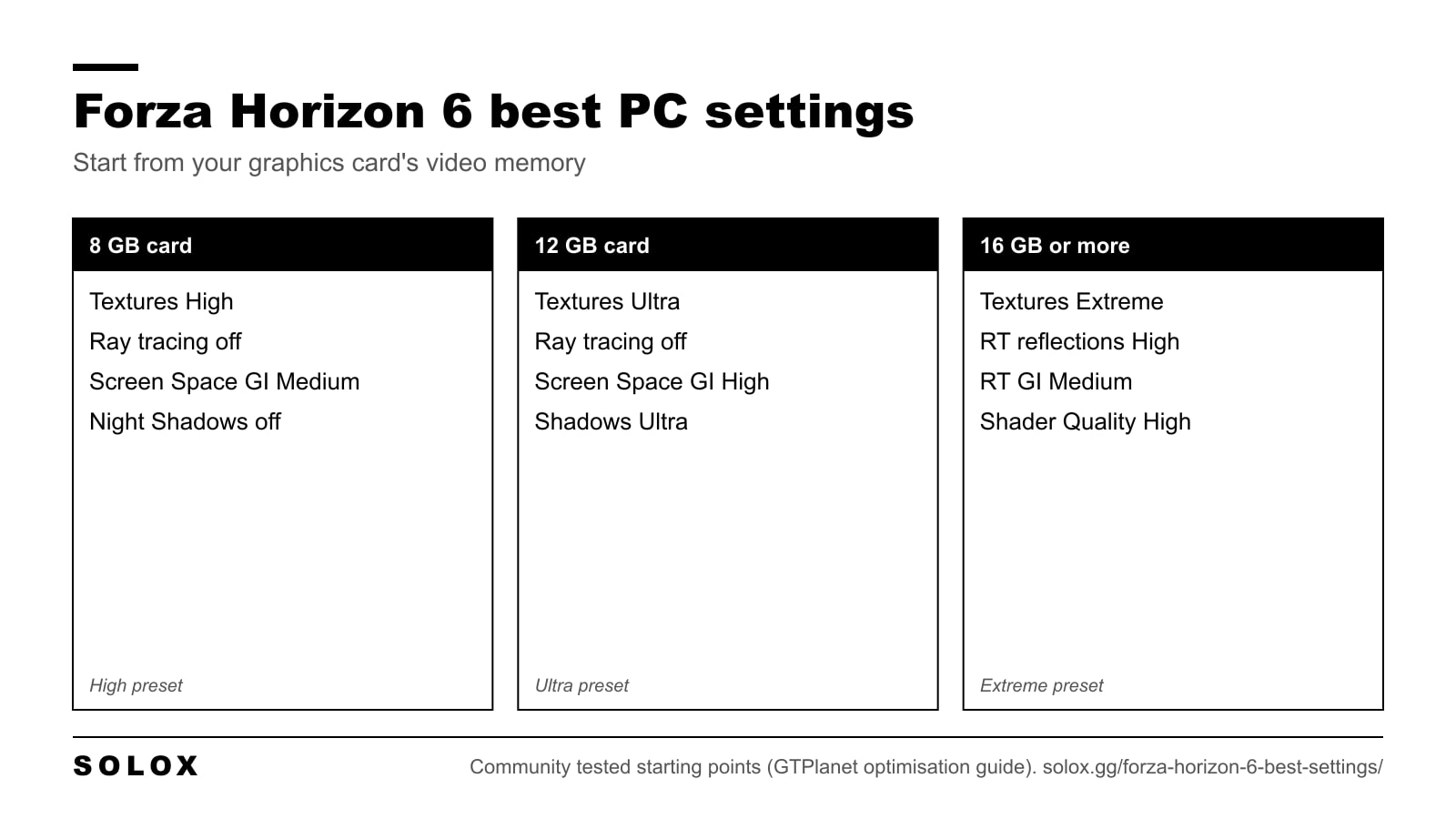
These values come from the GTPlanet optimisation guide. It is the most detailed testing I found. It is one source, so use it as a starting point and check your own frame rate.
| Setting | 16 GB or more | 12 GB | 8 GB |
|---|---|---|---|
| Car Level of Detail | Extreme | High | High |
| Environment Texture Quality | Extreme | Ultra | High |
| Environment Geometry Quality | Extreme | Ultra | Ultra |
| Car Reflection Quality | Extreme | High | High |
| Ray Traced Reflections | High | Off | Off |
| Screen Space Reflections | Off | High | High |
| Ray Traced GI | Medium | Off | Off |
| Screen Space GI | Off | High | Medium |
| Shadows Quality | Extreme | Ultra | Ultra |
| Night Shadows Quality | Extreme | Ultra | Off |
| Shader Quality | High | High | High |
| Deformable Terrain Quality | Extreme | Extreme | Extreme |
| Particle Effects Quality | Ultra | Ultra | Ultra |
| Volumetric Fog Quality | High | High | High |
A few notes on that table.
Environment Texture Quality is the memory setting. On an 8 GB card, High is mandatory. Go higher and the card runs out of memory, and you get stutter that no other setting fixes.
Environment Geometry Quality has a known problem. Players report a memory leak on Extreme over long sessions. If your frame rate drops after an hour, step down to Ultra.
Night Shadows are expensive. Turning them off is worth 10 percent or more. On a card that is struggling, this is the first thing I would cut. You lose shadows from headlights and street lamps at night, and nothing during the day.
Shader Quality on High is enough. Extreme is there if you have power to spare.
The 12 GB column is my reading of the guide. It gives values for 8 GB cards and for high end cards. For 12 GB I took the step in between, with screen space effects in place of ray tracing, which the guide suggests for cards from 8 to 12 GB.
Ray tracing: on or off?
Forza Horizon 6 has two ray tracing options. They are not equal.
Ray traced reflections work on cars and on the environment. On High the cost is small. If your card has 16 GB, turn them on. Wet Tokyo streets at night are where you see it.
Ray traced global illumination changes how light bounces around the whole scene. It looks clearly better than the screen space version. It also adds noise, mostly on trees and grass. Some people do not notice. Some cannot stop seeing it.
My advice: try ray traced GI on Medium for ten minutes in a forest area. If the shimmer bothers you, switch to Screen Space GI on High or Ultra and keep the reflections.
With an 8 GB card, leave both off. The memory is better spent on textures.
DLSS, FSR, XeSS and frame generation
The game supports DLSS, FSR and XeSS. Here is the part that surprises people: upscaling does not help much in this game.
The GTPlanet testing found minimal gains from upscaling. On an RTX 2080, DLSS Performance was 11 to 13 percent slower than Balanced, which is the opposite of what you expect. That points to the processor or memory being the limit, not the pixels.
So use it this way:
- If you already hold your target frame rate, use the native anti-aliasing mode: DLAA, FSR Native AA or XeSS Native AA.
- If you are a few frames short of 60, try the Quality level of your upscaler.
- Do not go below Balanced. You lose sharpness and gain almost nothing.
Frame generation was only available on Nvidia cards when the guide was written, with no AMD or Intel equivalent in the menu. That is a single source and it can change with a patch, so check your own menu. If you have it, use it only when your base frame rate is already above 60. Below that, it adds input lag you can feel in the steering.
Which preset for which PC
Match the official tiers to a starting preset. The full specs are in my Forza Horizon 6 system requirements, and the rest of the game is in my Forza Horizon 6 guide.
| Your PC | Start from | Target |
|---|---|---|
| GTX 1650, RX 6500 XT, Arc A380 | Low | 1080p, 60 fps |
| RTX 3060 Ti, RX 6700 XT, Arc A580 | High | 1440p, 60 fps |
| RTX 4070 Ti, RX 7900 XT | Extreme, ray tracing off | 4K, 60 fps |
| RTX 5070 Ti, RX 9070 XT | Extreme with ray tracing | 4K upscaled |
The game wants 16 GB of system RAM at minimum. That is double what the last game asked for. If you are coming from FH5, compare with my Forza Horizon 5 system requirements and my FH5 graphics settings. A PC that ran FH5 on high with 16 GB of RAM is close to the recommended tier here.
Fixing stutter and frame drops
Work through this in order. Change one thing, drive the same road, check again.
- Lower Environment Texture Quality one step. Stutter that comes and goes is almost always video memory.
- Turn Night Shadows off. The biggest single saving in the list.
- Turn ray traced GI off. Use Screen Space GI instead.
- Drop Environment Geometry from Extreme to Ultra. This also avoids the memory leak.
- Install the game on an SSD. Every official tier requires one. On a hard drive the world loads late and the game hitches.
- Update your graphics driver. A new game on an old driver is a common cause of hitching.
If the frame rate is fine but the picture is soft, check that dynamic resolution is off. That is the usual cause.
The other settings worth changing
Graphics are half of it. These change how the game drives.
- Steering: Simulation. Standard steering is filtered. This matters most on a wheel. The full list is in my Forza Horizon 6 wheel settings.
- Controller deadzones. If you play on a pad, the values are in my Forza Horizon 6 controller settings.
- Field of view. A wider view gives you more sense of speed and more warning before a corner. I explain how to set it in my FH5 field of view settings.
- Proximity Radar. It shows cars in your blind spots. Turn it on for online racing.
- Driving line: braking only. The full line teaches you to follow paint. The braking line still tells you where the corner is and lets you find your own way through it.
Once the game runs well, the next question is what to drive. My list of the best cars in Forza Horizon 6 covers every class.
FAQ
What are the best graphics settings for Forza Horizon 6 on PC?
Start from the preset that matches your card, turn dynamic resolution off, and use DLAA, FSR Native AA or XeSS Native AA. Then set Environment Texture Quality by video memory: High for 8 GB, Ultra for 12 GB, Extreme for 16 GB or more.
Should I use Quality or Performance mode on Xbox?
Performance. It runs at 60 fps on both Series X and Series S. Quality mode is locked to 30 fps, which is fine for photos and worse for driving.
What resolution does Forza Horizon 6 run at on Xbox Series S?
1080p at 60 fps in Performance mode and 1440p at 30 fps in Quality mode.
Is ray tracing worth it in Forza Horizon 6?
Reflections are, if you have a 16 GB card. They cost little on High. Ray traced global illumination looks better than the screen space version but adds noise on foliage, so try it before you keep it.
Why does Forza Horizon 6 stutter on my PC?
Usually the graphics card is out of video memory. Lower Environment Texture Quality one step, turn Night Shadows off and make sure the game is on an SSD.
Does DLSS or FSR improve performance in Forza Horizon 6?
Only a little. Community testing found minimal gains from upscaling. Use the Quality level to hold 60 fps, or the native anti-aliasing mode if you already have the frame rate.
Can an 8 GB graphics card run Forza Horizon 6 well?
Yes, with Environment Texture Quality on High and ray tracing off. Go above High on textures and the card runs out of memory.
Does Forza Horizon 6 have frame generation?
On Nvidia cards, yes. At the time of the community guide I used there was no frame generation option for AMD or Intel cards. Check your menu, since a patch can change that.