
The most important wheel setting in Forza Horizon 6 is not a force feedback slider. It is Steering, in the Difficulty menu. Set it to Simulation. On Standard the game filters your steering for a controller and the wheel feels vague whatever you do after that.
Then set the rotation on your wheel base, leave the deadzones alone and tune five sliders. That is the whole job.
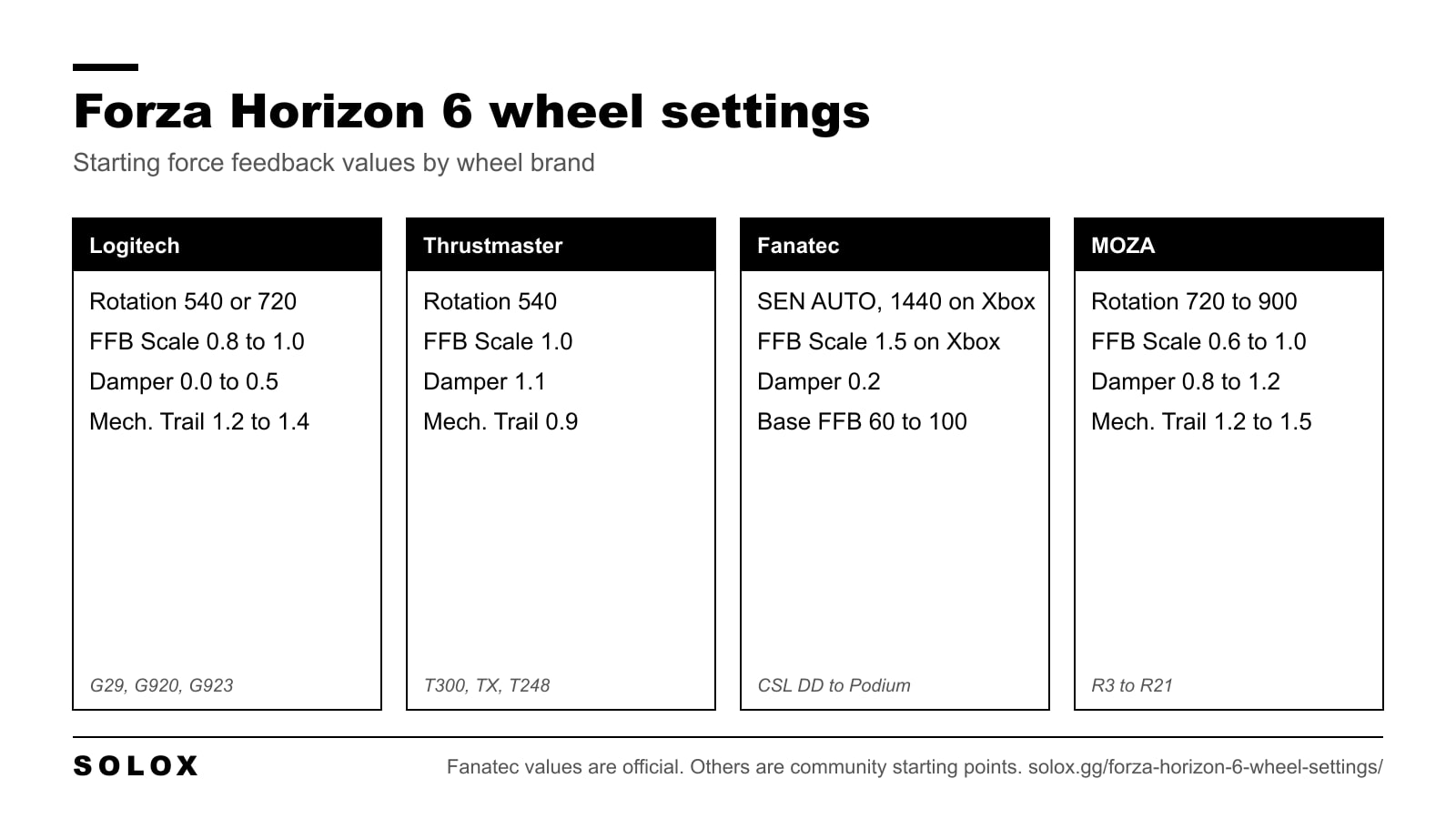
Below are the base settings, the values per brand and the fixes for the common problems. I checked everything on 4 October 2026. The Fanatec and MOZA values come from the manufacturers. The Logitech and Thrustmaster values are community tested starting points, not official numbers.
The quick version
| Setting | Value |
|---|---|
| Steering (Difficulty menu) | Simulation |
| Vibration | On |
| Invert Force Feedback | Off |
| Steering Axis Deadzone Inside | 0 |
| Steering Axis Deadzone Outside | 100 |
| Steering Linearity | 50 |
| Acceleration Axis Deadzone | 0 inside, 100 outside |
| Deceleration Axis Deadzone | 0 inside, 100 outside |
| Force Feedback Scale | Default, adjust last |
| Center Spring Scale | Default or lower |
| Wheel Damper Scale | 0.2 to 1.1, depends on the wheel |
| Mechanical Trail Scale | 0.9 to 1.5 |
| Off-Road Feel Scale | 0.7 or lower |
| Steering Sensitivity | 0.5 |
You find all of it under Settings, then Advanced Controls. The assists are under Settings, then Difficulty.
Difficulty settings for a wheel
| Setting | Value |
|---|---|
| Steering | Simulation |
| Braking | Anti-Lock On |
| Traction Control | Off |
| Stability Control | Off |
| Shifting | Your preference |
| Driving Line | Braking Only |
Stability control is the one that hurts most on a wheel. It brakes individual wheels when the car slides, and you feel that as the steering going dead in the middle of a corner. Switch it off and the car talks to you again.
Traction control off is faster once you are used to it. If you are on your first week with a wheel, leave it on for a few days and remove it later.
Rotation, deadzones and linearity
Forza Horizon 6 animates up to 540 degrees of steering in the cockpit view, depending on the car. That number is the animation. It is not a limit on your wheel.
What to set:
- Belt and gear driven wheels (Logitech, Thrustmaster): 540 degrees for fast steering, 720 if it feels twitchy.
- Direct drive on PC: 720 to 900 degrees, or let the base set it automatically.
- Fanatec on Xbox: Fanatec's own page says 1440.
For deadzones, 0 inside and 100 outside on every axis. That gives you the full range of the wheel and the pedals with nothing cut off.
Steering Linearity at 50 is a 1:1 response. You will see guides that run 25 with the outside deadzone at 65. That makes the wheel calmer around the centre and quicker at the end of the travel. It works, but it hides the problem instead of fixing it. If the car is twitchy, add rotation on the base first.
What each force feedback slider does
- Force Feedback Scale. The overall strength. Too high and the signal clips: every corner feels the same and you lose the detail. Set it last.
- Center Spring Scale. An artificial spring that pulls the wheel to the centre. It has nothing to do with the tires. Keep it low.
- Wheel Damper Scale. Adds weight and resistance. A little calms a nervous wheel. A lot makes it slow, and on a gear driven wheel it makes it notchy.
- Mechanical Trail Scale. How strongly the front tires pull the wheel straight. This is the slider that tells you when the car is sliding and helps the wheel come back when you catch it.
- Force Feedback Minimum Force. Lifts the smallest forces so a weak wheel does not have a dead zone in the centre.
- Force Feedback Load Sensitivity. How much the weight changes with the load on the front tires.
- Road Feel Scale and Off-Road Feel Scale. Bumps, kerbs and surface. Nice on tarmac, tiring on gravel.
- Vibration Scale. The rumble effects.
On a real car, the steering gets light a moment before the front lets go. That is the information you are trying to keep. Everything that adds weight without adding information (spring, damper, too much road feel) covers it up.
Logitech G29, G920 and G923
These wheels are gear driven. With too much force or damping they get noisy and slow, so the setup is light.
In G HUB:
| Setting | Value |
|---|---|
| Operating Range | 540 or 720 degrees |
| Sensitivity | 50 |
| Centering Spring | Off |
In game:
| Setting | Value |
|---|---|
| Vibration Scale | 0.5 |
| Force Feedback Scale | 0.8 to 1.0 |
| Center Spring Scale | 0.0 to 0.5 |
| Wheel Damper Scale | 0.0 to 0.5 |
| Mechanical Trail Scale | 1.2 to 1.4 |
| Force Feedback Minimum Force | 0.8 to 1.0 |
| Force Feedback Load Sensitivity | 0.5 to 0.8 |
| Road Feel Scale | 0.4 to 0.6 |
| Off-Road Feel Scale | 0.2 to 0.5 |
| Steering Sensitivity | 0.5 |
If it rattles on dirt, lower Off-Road Feel first, then Road Feel, then Force Feedback Scale.
The Logitech RS50 is a different case. It runs in its native mode in this game, and the values are in my RS50 settings by game. For the last game on the older wheels, see my FH5 settings for the G29 and G920.
Thrustmaster T300, TX and T248
In the Thrustmaster Control Panel:
| Setting | T300 and TX | T248 |
|---|---|---|
| Rotation | 540 degrees | 540 degrees |
| Overall Strength | 75% | 65% |
| Constant | 100% | 100% |
| Periodic | 100% | 100% |
| Spring | 100% | 100% |
| Damper | 100% | 100% |
| BOOST | Off | Off |
| Auto-Center | By the game | By the game |
On the T248 itself: FORCE at 4 bars and FFB at 1.
In game:
| Setting | Value |
|---|---|
| Vibration Scale | 0.7 |
| Force Feedback Scale | 1.0 |
| Center Spring Scale | 0.0 |
| Wheel Damper Scale | 1.1 |
| Mechanical Trail Scale | 0.9 |
| Force Feedback Minimum Force | 1.1 |
| Force Feedback Load Sensitivity | 1.2 |
| Road Feel Scale | 1.0 |
| Off-Road Feel Scale | 0.7 |
| Steering Sensitivity | 0.5 |
Not everybody agrees on these. Other tuners run Wheel Damper lower, at 0.5 to 0.9, and Mechanical Trail higher, at 1.2 to 1.5. If the wheel feels heavy and slow with the table above, move toward those numbers.
My FH5 Thrustmaster settings are still up if you play both games.
Fanatec
These are Fanatec's official recommended settings, so I trust them more than anything else on this page.
In game, on PC:
- Steering: Simulation
- Invert Force Feedback: Off
- Wheel Damper Scale: 0.2
- Everything else at default
In game, on Xbox, the same plus:
- Force Feedback Scale: 1.5
- SEN on the base: 1440
On the base (Tuning Menu):
| Setting | CSL DD, GT DD Pro | ClubSport DD, DD+ | Podium DD1, DD2 |
|---|---|---|---|
| SEN | AUTO (1440 on Xbox) | AUTO (1440 on Xbox) | AUTO (1440 on Xbox) |
| FFB | 100 | 70 | 60 |
| FFS | PEAK | Not used | PEAK |
| NDP | 20 | 20 | 30 |
| NFR | 0 | 0 | 0 |
| NIN | 0 | 0 | 0 |
| INT | 3 | 3 | 2 |
| FEI | 100 | 100 | 100 |
| FOR | 100 | 100 | 100 |
| SPR | 100 | 100 | 100 |
| DPR | 100 | 100 | 100 |
The pattern is simple: the stronger the base, the lower the FFB value. A Podium at 60 and a CSL DD at 100 end up in a similar place at the rim.
The full table is on Fanatec's Forza Horizon 6 page. For FH5, my Fanatec settings are here.
MOZA
MOZA confirms that all its wheel bases have force feedback in Forza Horizon 6. Its setup page does not give in game slider values, so these are community starting points:
| Setting | Value |
|---|---|
| Rotation (Pit House) | 720 to 900 degrees |
| Game Force Feedback Intensity (Pit House) | 100% on R3, R5 and R9, 70 to 90% on R16 and R21 |
| Vibration Scale | 0.4 to 0.6 |
| Force Feedback Scale | 0.9 to 1.0 on R3 and R5, 0.6 to 0.9 on stronger bases |
| Wheel Damper Scale | 0.8 to 1.2 |
| Mechanical Trail Scale | 1.2 to 1.5 |
To get the rev lights and the dash on a MOZA wheel working, switch on the telemetry. In Settings, HUD and Gameplay, at the bottom:
- Data Out: On
- Data Out IP Address: 127.0.0.1
- Data Out IP Port: 20066
The steps are on MOZA's Forza Horizon 6 support page. How I set up the R9 in other games is in my MOZA R9 settings, and the smaller base is in MOZA R5 settings.
How to tune it by feel
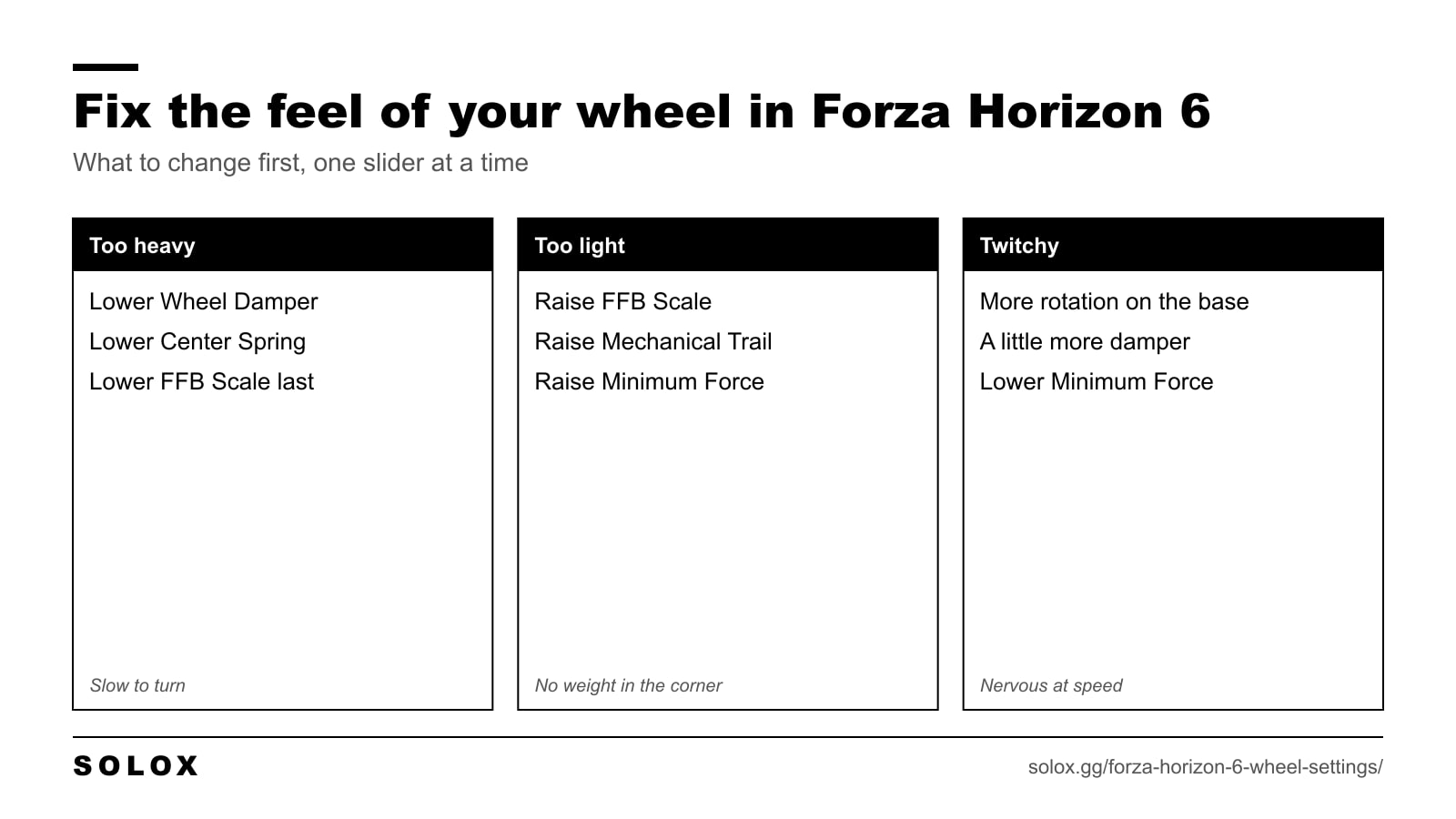
Pick one road you know and one car. Change one slider, drive, compare. If you change three things at once, you learn nothing.
- Too heavy, slow to turn. Lower Wheel Damper Scale, then Center Spring Scale. Only then Force Feedback Scale.
- Too light, no weight in the corner. Raise Force Feedback Scale in small steps, then Mechanical Trail Scale.
- Dead in the centre. Raise Force Feedback Minimum Force a little.
- Wheel shakes on the straight. Lower Force Feedback Minimum Force. Too much of it makes the wheel oscillate.
- Twitchy at speed. More rotation on the base. Then a little more damper.
- Hard to catch a slide. Raise Mechanical Trail Scale and lower the damper, so the wheel can spin back on its own.
- Every corner feels the same. You are clipping. Lower Force Feedback Scale.
- Arms tired after ten minutes off road. Lower Off-Road Feel Scale.
For drifting, the wheel has to return fast on its own. That means low damper, low centre spring and 900 degrees if your base allows it. The cars to do it with are in my best drift cars in Forza Horizon 6 list.
Wheel not working or no force feedback
Most problems on PC come from the order in which Windows sees your devices. The game sends force feedback to the first device.
- Close the game. Unplug pedals, shifter and handbrake if they have their own USB cable. Leave only the wheel base.
- Open the Windows game controller settings and set the wheel base as the preferred device.
- Start the game and bind the controls under Settings, Controls. Bind everything with a warning mark, or the profile is not saved.
- Check that you have force feedback. Then plug the other devices back in, one at a time, and bind them.
Other things that break it:
- Changing the wheel while the game is running. Restart the game after any hardware change.
- Unplugging and plugging the wheel back in with the game open.
- Drivers for more than one wheel brand installed at the same time.
- Old firmware. Update G HUB, the Thrustmaster driver, the Fanatec driver or Pit House before you start.
- Force feedback pulling the wrong way. Switch Invert Force Feedback on.
Before you buy a wheel for this game, check your model on the official supported wheels list.
Is it worth playing on a wheel?
Yes, with the right expectation. Forza Horizon 6 is built for a controller first, and it does not feel like a simulator. The force feedback is simpler than in iRacing or Assetto Corsa. With Simulation steering and the settings above, it is a very good cruising, touge and drifting game on a wheel.
For graphics and frame rate, see my Forza Horizon 6 best settings. If you switch between the wheel and a pad, the pad values are in my Forza Horizon 6 controller settings. The menu is the same as in the last game, so my FH5 wheel settings page still applies if you play both. Which car to drive is in my best cars in Forza Horizon 6 list, and everything else is in my Forza Horizon 6 guide.
FAQ
What are the best wheel settings for Forza Horizon 6?
Steering on Simulation, deadzones at 0 and 100, Steering Linearity at 50, Center Spring low and Force Feedback Scale set last so it does not clip. The damper and mechanical trail values depend on your wheel.
What steering rotation should I use in Forza Horizon 6?
540 degrees on Logitech and Thrustmaster wheels, 720 if it feels twitchy. 720 to 900 on a direct drive base on PC. Fanatec recommends 1440 on Xbox.
Should I use Normal or Simulation steering on a wheel?
Simulation. Standard steering is filtered for a controller and feels vague on a wheel.
Why is there no force feedback in Forza Horizon 6?
On PC the game sends force feedback to the first device it sees. Unplug everything except the wheel base, set the base as the preferred device in Windows, bind the controls, then reconnect the rest.
Does Forza Horizon 6 support Fanatec, MOZA, Logitech and Thrustmaster?
Yes. All four brands are supported. Check your exact model on the official supported wheels list, because not every base has the same level of support.
What are the best Logitech G29 settings for Forza Horizon 6?
Operating Range 540 or 720 degrees in G HUB. In game, Force Feedback Scale 0.8 to 1.0, Wheel Damper Scale 0.0 to 0.5, Mechanical Trail Scale 1.2 to 1.4 and Road Feel Scale 0.4 to 0.6.
What are the Fanatec settings for Forza Horizon 6?
Wheel Damper Scale 0.2 in game and Steering on Simulation. On the base, FFB 100 for the CSL DD, 70 for the ClubSport DD and 60 for the Podium. On Xbox, add Force Feedback Scale 1.5 and SEN 1440.
Is Forza Horizon 6 good with a wheel?
Yes, for cruising, touge and drifting. It is built for a controller first, so do not expect simulator force feedback.