
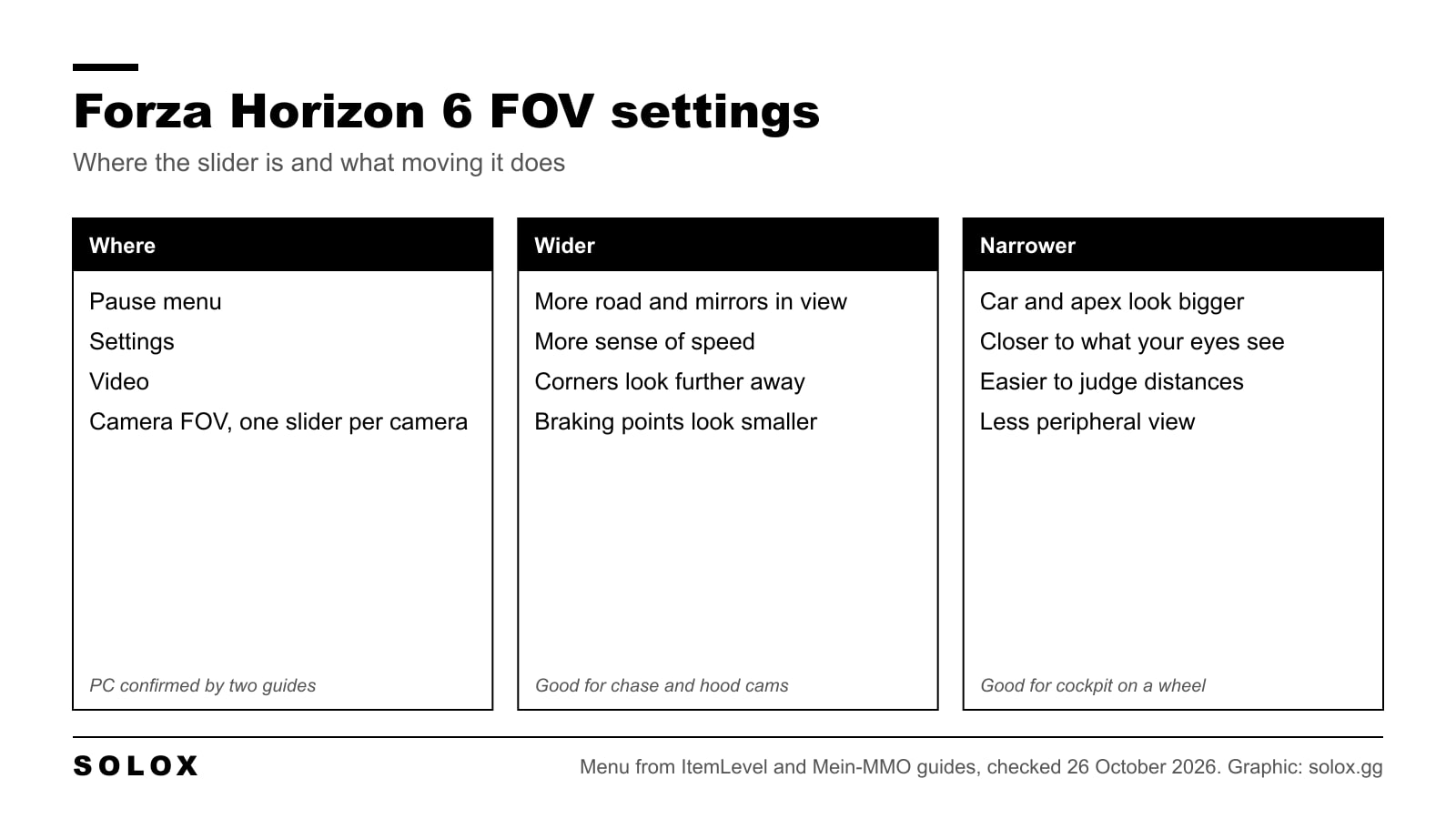
The field of view settings in Forza Horizon 6 are in the Video menu: open the pause menu, go to Settings, then Video, and scroll down to Camera FOV. Each camera has its own slider, and you can change them one by one.
Which value to pick depends on how you play. That is the part most guides skip, and it is the part that changes how well you drive.
Checked on 26 October 2026 against the ItemLevel FOV guide (17 May 2026) and the Mein-MMO settings guide (May 2026). I could not open Playground's own support pages, so the menu path is from those two guides, which agree. For the rest of the PC options, see my Forza Horizon 6 best settings.
Where the FOV setting is in FH6
- Open the pause menu.
- Go to Settings.
- Open Video.
- Scroll down to Camera FOV.
One guide gets there through the Campaign tab of the pause menu. If you do not see Settings straight away, look there.
There is a live preview next to the sliders, so you can see the change before you leave the menu. And according to the Mein-MMO guide, FOV has no effect on performance, so you do not trade frames for it.
On Xbox: ItemLevel reports that some Xbox players only see Performance or Quality in the graphics settings and no Camera FOV options. I have not been able to confirm whether that is a platform limit or a bug. If the sliders are missing on your console, that is why.
Which cameras have a slider
Mein-MMO lists six: Chase Cam, Far Chase Cam, Driver Cam, Dashboard Cam, Hood Cam and Bumper Cam. Each one keeps its own value. So you can set the cockpit view tight for racing and leave the chase cam wide for free roam, and switch cameras without going back into the menu.
What FOV actually does to your driving
A wider field of view squeezes more of the world onto the same screen. A narrower one zooms in.
Wide feels fast. That is why the default views are usually wide: the world rushes past and it looks exciting. But it shrinks everything in front of you. The apex looks further away than it is, the braking board looks smaller, and you brake early without knowing why.
Narrow feels slow, and that is the honest view. When the size of things on screen is close to what your eyes would see from your seat, you judge distances the way you would in a real car. In a real car you learn braking points by what you see from the seat. A view that shrinks the corner throws that judgement away.
How to pick your value
The guides I checked do not say what unit the FH6 slider uses or what the range is, so I am not giving you a number to type in. Use this method instead.
Cockpit or dashboard view on a wheel. Start from the default and close the view down until the dashboard and the wheel on screen look about the size of the real ones would from where you sit. Drive five laps of a road you know. If corners arrive sooner than they used to and you brake later without trying, you went the right way.
Hood or bumper view. These have no interior to scale against, so pick a value where the road ahead is clear and the edges of the screen are not stretched. If cars beside you look pulled sideways at the edges, it is too wide.
Chase cam on a pad. Leave it wide. You are not judging braking points from inside the car, and seeing more around you helps in traffic and in free roam.
On a TV across the room. A TV far away covers a small part of what you see, so a "correct" narrow view feels like looking through a tube. Go a bit wider than on a monitor. You give up some judgement for comfort, and on a sofa that is the right trade.
How wide is your screen really?
If you want to see why a close monitor and a far TV need different settings, this is the angle each screen covers from your eyes. It is our own maths, not a game value: twice the arctangent of half the screen width over your eye distance.
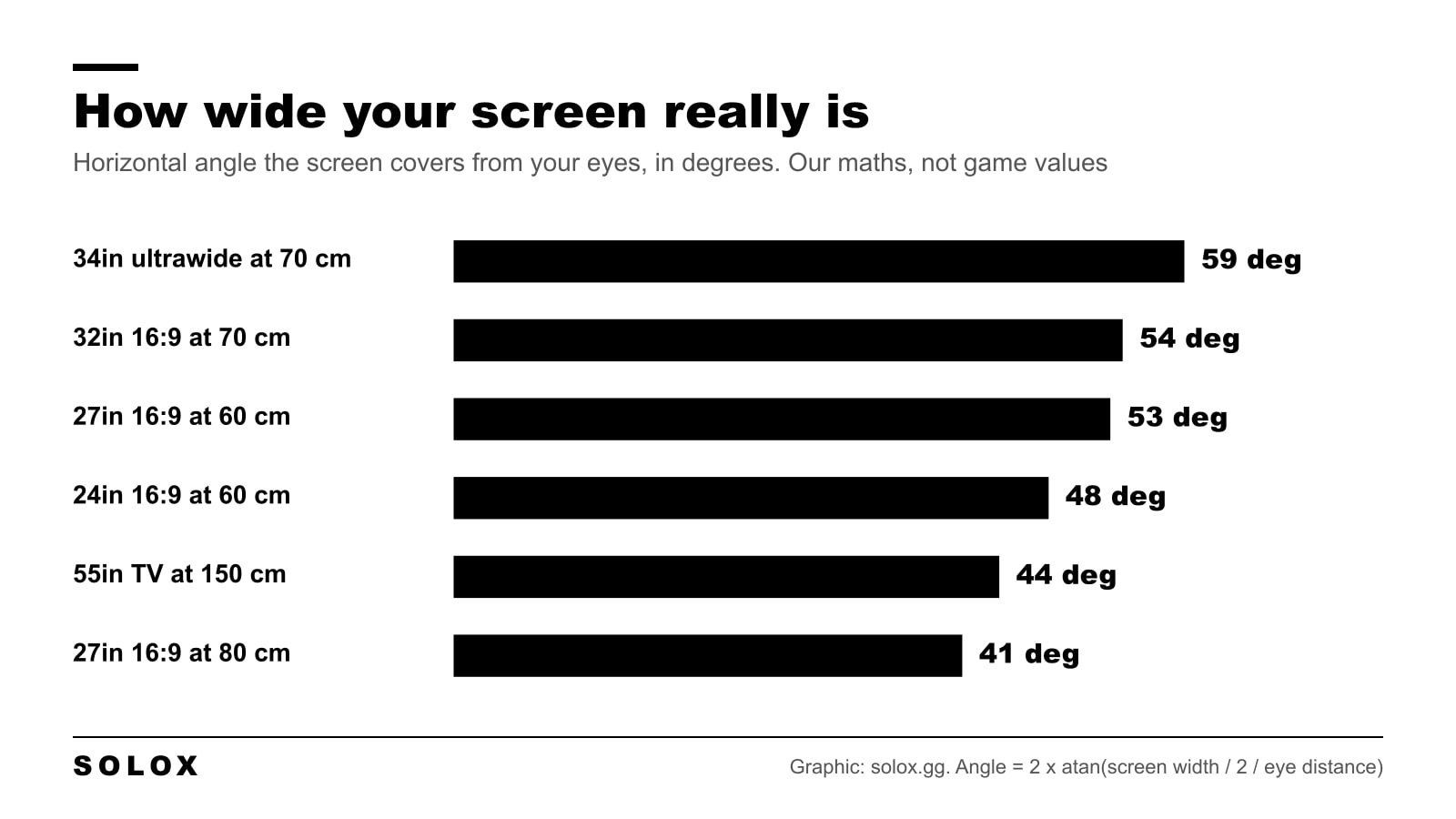
A 27 inch monitor at 60 cm covers about 53 degrees across. Push it back to 80 cm and it drops to about 41. That is why moving your screen closer is often a better fix than moving the slider: the closer screen lets you run a wider view that is still true to size. I go through screen size and distance in my sim racing monitor guide.
If you play on a wheel
FOV is only one part of a wheel setup. The rest of the wheel setup is in my Forza Horizon 6 wheel settings, and the pad version is in my Forza Horizon 6 controller settings. Everything else about the game is in my Forza Horizon 6 guide.
FAQ
Where is the FOV setting in Forza Horizon 6?
Pause menu, Settings, Video, then scroll down to Camera FOV. Each camera has its own slider and there is a live preview.
What is the best FOV in Forza Horizon 6?
There is no single number. On a wheel in the cockpit view, go narrower than the default until the dashboard looks life size. On a pad with the chase cam, keep it wide. On a TV across the room, go a little wider than you would on a monitor.
Does FOV affect FPS in Forza Horizon 6?
The Mein-MMO settings guide says the FOV sliders have no effect on performance.
Why can't I find the FOV setting on Xbox?
One guide reports that some Xbox players only see Performance and Quality in the graphics menu, without the Camera FOV options. It is not clear yet whether that is on purpose.
Can I set a different FOV for each camera?
Yes. Chase, Far Chase, Driver, Dashboard, Hood and Bumper each have their own slider.